Hi Louie,
My sincere apologies for not being able to assist you on your previous issue.
Now, as far as the Interactions are concerned, they were originally designed to be placed as a standalone content on the slide.
Also if you try to resize your interaction and place it on the slide along with other content/objects, published output will always give a priority to Interaction as it would consider it to be an Interaction specific slide.
In the previous project you shared, you were trying to time the Interaction using PowerPoint animations and wanted it to appear later on the slide play rather than on the start. But as explained above, Presenter did not honour this setting in your project because it actually considered it to be an interaction slide and displayed the interaction from the beginning of the slide play itself.
Also as far as the issue stated in this thread is concerned, there is no direct way to do this but I would like to suggest something which might help you.
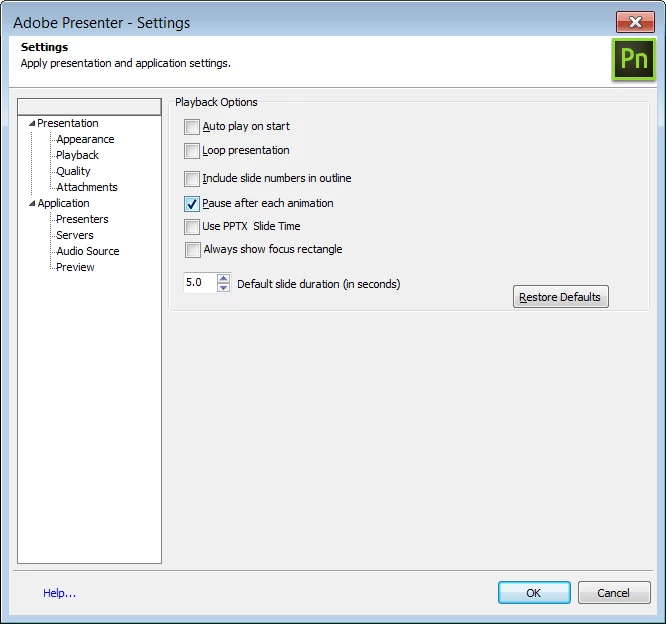
If you want to keep interaction on your slide along with other content, Interaction will definitely be available from the start of the slide. Surely there is no way to delay its appearance, but you can still use the animation associated with Interaction for another purpose. Within your Presentation settings -> Playback option, you can enable the feature of "Pause after each animation" (See below screenshot). It will basically help you achieving the feature of auto-pausing in between your animations, using which your narration would automatically stop, right before you state in your narration and notify the Learner to click on various Interaction tabs. All you need to do is time your narration and animation correctly so that the slide play does not pause too many times in between. Hope you get the idea of what i am trying to say.
Please mark this answer as correct, if you find it helpful. We would surely consider these kind of scenarios to be achievable directly in the application for our future release and updates.
Thanks,
Zeeshan Hussain
Adobe Presenter Engineering Team


 AdChoices