Participant
January 4, 2013
Answered

Modifying the Rating Scale

  • January 4, 2013
  • 1 reply
  • 961 views

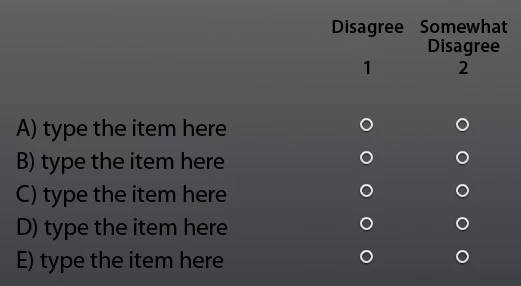
I have 5 questions and the answer to each question is either Fraud or Abuse.  I was hoping I can set it up like a Rating Scale where I list the 5 questions in rows (A - E) and the radio buttons colum header as Fraud and Abuse (vs. Disagree, Somewhat Disagree). I also would like to have the option to retry (if one of the answer is incorrect) or continue (if all answers are correct).

Or any idea how I could accomplish such as task?
Thank you,

Sharon

This topic has been closed for replies.
Correct answer Lilybiri

Thank you so much Lilybiri, I got it to work after following your blog: http://lilybiri.posterous.com/widgets-and-custom-questions-part-1
and google a way to add the variable in the caption box.


Fine, could you mark the thread as answered? It is still 'unanswered'.

Long time ago I wrote two introduction articles concerning use of variables:

http://kb2.adobe.com/community/publishing/862/cpsid_86299.html    use without advanced actions

http://kb2.adobe.com/community/publishing/871/cpsid_87182.html     use with advanced actions

Lilybiri

1 reply

Lilybiri
Legend
January 4, 2013

Hello,

You will have to create your own slides, and use the extended radiobuttons widget (see Jim Leichliter, aka CaptivateDev/CaptivatePro). That is the only way to reset the variable associated with the widget. I have some examples on my blog using that widget. But first tell me which version you are using and if you have to report to a LMS?

Lilybiri

Participant
January 4, 2013

Thanks for the reply.  I am using Captivate 5.5 and as for the LMS...I dont know that that entails as far as this project goes. I've only started using this software last month.  The course will be in AdobeConnect and yes, I would like to track the participants quiz results.

Participant
January 4, 2013

Hi Lilybiri,

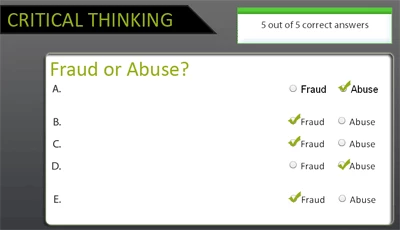
I found your blog (http://kb2.adobe.com/community/publishing/902/cpsid_90274.html) and got the radiobutton extended widget from CaptivateDev site....I got as far as this:

You're right, formatting was not as friendly.  My original background color doesnt seem to be accepted, it kept changing it to another color.  I added a new master background with white rounded box as a workaround -- I still cant figure out why the first widget text is darker than the rest.  I used black on all but 4 shows lighter than the first.

Anyway, I tried reading your blog but since I am new to Captivate...I have 0 background on Advanced Actions...so I'm confused how to make it part of the quiz.  Any help is greatly appreciated.

Thank you,

Sharon