Participant
July 25, 2022
Answered

MODULE IS MARKED AS INCOMPLETE - CAPTIVATE 2019

  • July 25, 2022
  • 1 reply
  • 473 views

Hi everyone,


I'm working on an eLearning project. Everything was fine at the beginning until users complained that the last module of my course cannot be completed even though they have viewed every slide of the course.


I ran the file on SCORM Cloud to ensure it's not an LMS problem. It turned out that the module was marked as incomplete. I don't understand the SCORM Debug Log, please help me figure out the issue. Here is the link to the log: https://app.cloud.scorm.com/sc/guest/ViewDebugLog?logId=00003539-d402-4e64-90c6-4d6e6fc067fe&courseTitle=Captivate+E-Learning+Course)


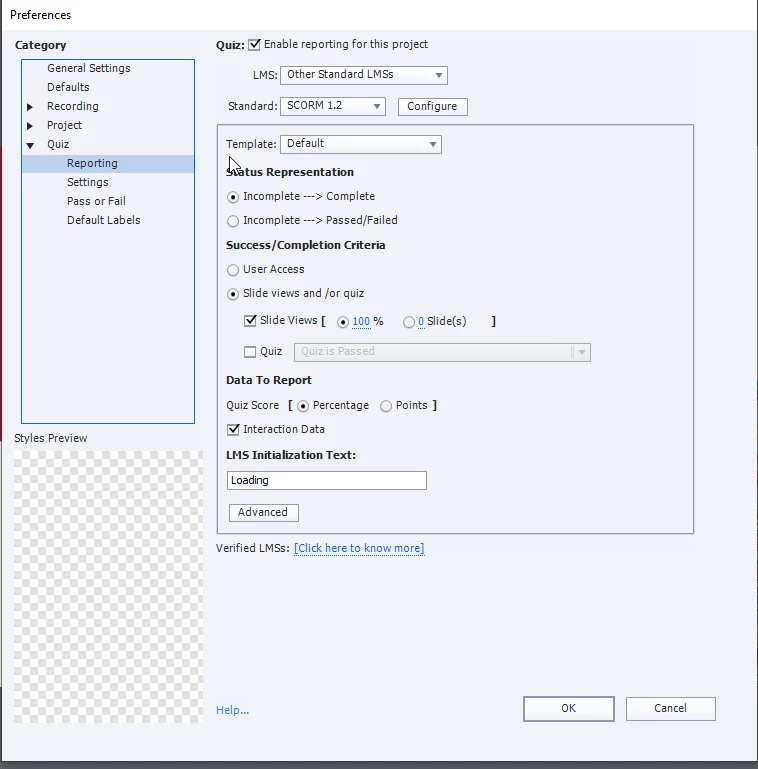
Below is my Captivate's setting. Did I do something wrong? Please help!! Thanks ahead!


This topic has been closed for replies.
Correct answer RodWard

My guess would be that even though your users THINK they may have visited every slide there is still at least one slide that they have not visited and this is the reaso why the module is not completing.


To be quite honest, I think it is almost always a bad idea to use slide completion as a success criteria.  There are just too many ways that this can fail and cause issues.  Additionally, using slide completion doesn't really guarantee that your learners actually learned anything or even that they were paying undivided attention to your content.  


If the original reason for choosing this method is that you wanted to make sure the learners saw enough of the content, then I prefer to just place a button at the end of the content that will pause playback and instruct the learner they need to click this button.  This button is set to have a score reported to the quiz and that is all the learner needs to achieve completion. 


You also need to make sure that the navigation is set up so that the learner must progress through the content and cannot jump straight to the slide containing that button. But by using this method I never have to resort to slide completions.


The better way to verify that is to include assessment components with appropriate difficulty so that only if the learner actually viewed the content would they then know how to pass the assessment.

1 reply

RodWard
Community Expert
RodWardCommunity ExpertCorrect answer
Community Expert
July 25, 2022

My guess would be that even though your users THINK they may have visited every slide there is still at least one slide that they have not visited and this is the reaso why the module is not completing.


To be quite honest, I think it is almost always a bad idea to use slide completion as a success criteria.  There are just too many ways that this can fail and cause issues.  Additionally, using slide completion doesn't really guarantee that your learners actually learned anything or even that they were paying undivided attention to your content.  


If the original reason for choosing this method is that you wanted to make sure the learners saw enough of the content, then I prefer to just place a button at the end of the content that will pause playback and instruct the learner they need to click this button.  This button is set to have a score reported to the quiz and that is all the learner needs to achieve completion. 


You also need to make sure that the navigation is set up so that the learner must progress through the content and cannot jump straight to the slide containing that button. But by using this method I never have to resort to slide completions.


The better way to verify that is to include assessment components with appropriate difficulty so that only if the learner actually viewed the content would they then know how to pass the assessment.

Participant
July 25, 2022

Thanks for the explanation. I set the slide views to 95% and reduced the duration of some slides to match the slide audio. Somehow the problem has been tackled. In the future, I'll apply the methods you suggested for my upcoming projects. I appreciate your support. 

RodWard
Community Expert
Community Expert
July 26, 2022

Yes, if reducing the slide view percentage solves the problem, that usually indicates the original issue was that not all slides were being visited.  If that solves your problem, that's great.  The reason I did not suggest it was that in some LMSs the person sees that they only got 95% and then they complain about that.  But perhaps this won't be a problem in your case.