Inspiring
June 20, 2017
Answered

Moodle and Captivate

  • June 20, 2017
  • 2 replies
  • 5146 views

Hi All,

Is it possible to create a eLearning where I fill in a name to start the eLearning and have 5 questions and at the end a certificate option that shows the name of the person and making it possible to print the certificate?

All this should be monitored by moodle:

- Name

- Passed or not passed

- Questions (answers)

Any info is welcome.

Thanks in advance.

Best regards,

Dick
This topic has been closed for replies.
Correct answer Pkoel

Hi Dick,

   there are a lot of good tutorials on UTube as well as the Moodle.org site. It all depends on the version of Moodle you are running. The usual use case is as follows:

1. Create a course in Moodle

2. Create an activity in Moodle and embed your Captivate SCORM module

3. Set enrollment options for the created course

The student enrolls in the course and clicks on the activity to run the SCORM module.

Moodle 3.1 Overview - YouTube

General help link

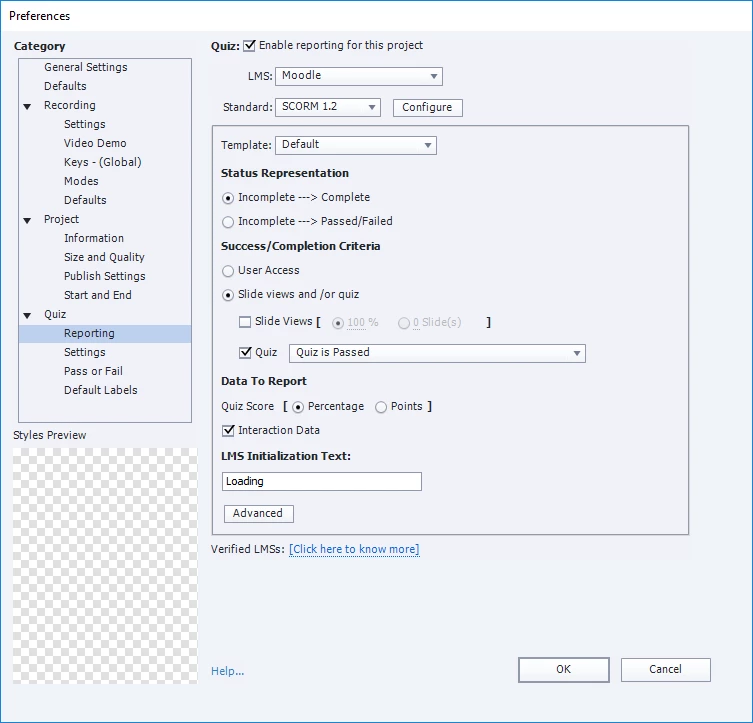
A screen capture of what the Captivate publish screen looks like and the option to pass to the LMS

Cheers,

Peter

2 replies

Pkoel
Inspiring
June 27, 2017

Yes, that will work.If you really want to get creative, download the badge plugin and have them earn a badge as well. One way to add a gamification element.

Peter

Inspiring
June 27, 2017

Hi Peter,

Thanks for your response. Gameification would be really nice. Still a bit new with the software, but I can find loads of tutorials and info online so I will play around a bit. Thanks again!

Best regards,

Dick

Pkoel
Inspiring
June 20, 2017

Hi Dick,

  I use Captivate and Moodle. The name of the student will be captured when they enroll in the course. The score will be recorded in the SCORM settings when you create the e-learning output in Captivate. You will upload the SCORM file as an activity in the Moodle class.

Sincerely,

Peter

Inspiring
June 20, 2017

Hi Peter,

Thanks for the feedback. I'm new with Moodle and LMS's in total. Do they have some guides anywhere that tells me how this works exactly? How does a student enroll? Normally I build a basic eLearning with no LMS. So everybody that visits the eLearning follows the training and that's all. But now I really want to make it personal, people give up their name and start the course. Any good tutorials on how to set this up that you know of?

Thanks!!

Best regards,

Dick

Pkoel
PkoelCorrect answer
Inspiring
June 20, 2017

Hi Dick,

   there are a lot of good tutorials on UTube as well as the Moodle.org site. It all depends on the version of Moodle you are running. The usual use case is as follows:

1. Create a course in Moodle

2. Create an activity in Moodle and embed your Captivate SCORM module

3. Set enrollment options for the created course

The student enrolls in the course and clicks on the activity to run the SCORM module.

Moodle 3.1 Overview - YouTube

General help link

A screen capture of what the Captivate publish screen looks like and the option to pass to the LMS

Cheers,

Peter