

Mouse Cursor Object showing up in published project even when it's not showing on timeline
Using Adobe Captivate 9.0.2.437 on Mac OS X 10.12.6
I am trying to build a software simulation that employs a mix of "let the user try" and "show the user". I want to first give the user the opportunity to try the activity with minimal/no prompting. I have a clickbox set to have a maximum of 2 attempts. The failure text appears near the area the user should click with some prompting. If the user still doesn't click the correct box, I want a mouse cursor to appear and click the area for them and continue the project.
The problem is, even though I have the mouse cursor on the timeline to not appear until about 2 seconds in, it will appear on the first frame in the published project. Here's what my timeline looks like:
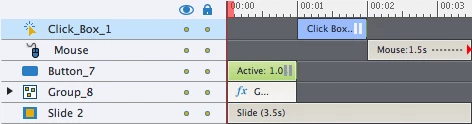
And here's the timeline for the next slide:
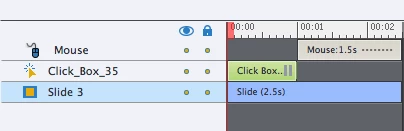
On both of these slides, the mouse cursor is displaying from the first frame. This is a problem because it "tips" the user to where they should click. The only way I see around this is to create a duplicate slide with just the cursor action, but that is going to double the number of slides in my project. I don't understand why Adobe Captivate isn't respecting the timeline. The mouse cursor object is behaving unlike any other timeline element: when the object doesn't occupy space on the timeline, it doesn't appear, yet the mouse cursor object appears all the time.
If anyone has advice, I'd appreciate it.
Thanks!
 AdChoices