Mouse movements in Captivate
Hi all,
I tried searching the forums for a solution to this problem but I can't find a
thread with the answer and it's driving me mad.
I am trying to produce a Captivate movie and I want to insert a "mouse"
(BTW, the version that I am using is Captivate 3 as this is the only version
that we have a licence for etc)
Let's say I have 2 slides.
On the first slide slide, I go to the Top menu, Insert and then select Mouse.
I then get a mouse as you would see in the attached image. Cursor "A" is
the end cursor that moves around etc. Point "B" is what I would call the "origin",
and this is where the mouse starts before moving along the path in Blue.
Obviously, on the screen, you can move A to any location, but you can also move B
around as well.
This is all well and good as I can manipulate this to suit the movie.
But if I go to the next slide and try to insert another mouse like this one, all I get is a mouse
with the end cursor "A", the path in blue but no origin point "B" that I can move around etc.
I can only move A around!
BUT, if I remove this mouse and then delete the FIRST slide with the fully adjustable mouse
with this origin point etc, I can go to the second slide and insert this type of mouse.
It's as if I can only insert a mouse like this on one slide ONLY which I am finding infuriating
OR am I missing something dead simple in the menu settings etc
Thanks in advance for any help
Cheers
Keith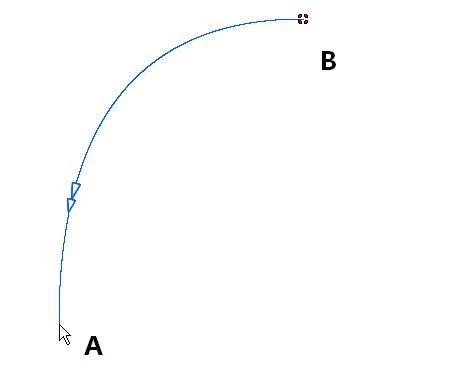
 AdChoices