Katherine_Chiu
Known Participant
March 16, 2015
Answered

Move to next slide until you answer the question correctly

  • March 16, 2015
  • 1 reply
  • 671 views

I am using Adobe Captivate 6, and I am setting a quiz that if the trainees continue to next slide, they need to answer this question correctly.

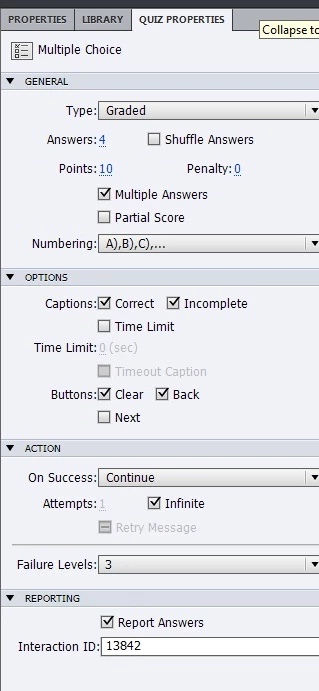
Below is my setting.
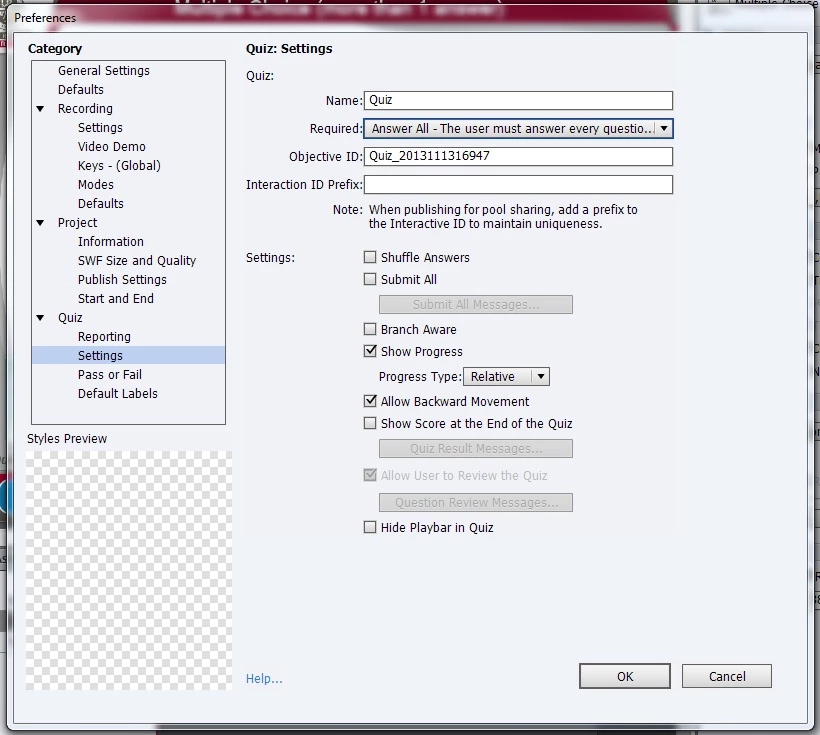
After above setting, when I reach this quiz, it did not allow me to continue. and then I answer it wrongly and then click submit, it show that I answered wrongly. Then I click the forward button, it allow me to move to next slide. I suppose I cannot do that. May I know whether the setting is correct? Thanks! 

    This topic has been closed for replies.
    Correct answer Lilybiri

    Take out the required option. Since you have Infinite attempts, user will not be able to get on unless he submits a correct answer. And you did hide the Next button, which means he cannot skip. But I think it is a bad idea to allow Backwards navigation, because when a user navigates Back, the Next button is not there, so he will be stuck totally.  And if you want to allow Review, you need that Next button as well. And you didn't hide the playbar, that means the user could skip questions.

    I would reset the Required option to Optional. Then Hide the Playbar in Quiz, and do not allow Backward movement. Drag the Next button under the Clear button if you want the Review possibility but I suspect that is not the case because you don't show the Score slide, which means that you will not have the Review feature.

    1 reply

    Lilybiri
    LilybiriCorrect answer
    Legend
    March 16, 2015

    Take out the required option. Since you have Infinite attempts, user will not be able to get on unless he submits a correct answer. And you did hide the Next button, which means he cannot skip. But I think it is a bad idea to allow Backwards navigation, because when a user navigates Back, the Next button is not there, so he will be stuck totally.  And if you want to allow Review, you need that Next button as well. And you didn't hide the playbar, that means the user could skip questions.

    I would reset the Required option to Optional. Then Hide the Playbar in Quiz, and do not allow Backward movement. Drag the Next button under the Clear button if you want the Review possibility but I suspect that is not the case because you don't show the Score slide, which means that you will not have the Review feature.

    Katherine_Chiu
    Known Participant
    March 17, 2015

    Thanks Lilybiri.

    Is that mean if I did not hide the playbar, the user can skip the quiz even I set infinite attempts and Required option - answer all?

    Also, I need to back button to let the user to get back to previous slide to check the correct answer.

    Do you think add a button in the quiz is ok?

    Lilybiri
    Legend
    March 17, 2015

    As I told, perhaps not clearly, if you add a Back button, you need a Next button as well and that will allow your users to skip questions.

    Only a shape button can be added to a question/score slide.

    Buttons on Question/Score Slides in Captivate 6? - Captivate blog