Participant
February 12, 2011
Answered

Moving in captivate

  • February 12, 2011
  • 2 replies
  • 1661 views

Hello,

Captivate4  capabilities to create an object that is moving in the page?
For example, Can  moves caption from top of page to bottom of page in captivate4 ?

Thanks in Advance

    This topic has been closed for replies.
    Correct answer Lilybiri

    Hello,

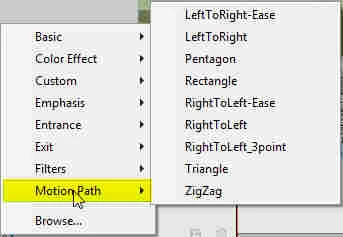
    In Captivate 5 the Effects feature covers a whole bunch of things: color effects (blurring,alpha...), transformation (scaling, rotating, skewing....), filters (shadow, bevel...), entrance and exit effects (including several moving effects), motion paths (for movement with possibility of adapting the path). You can combine effects and save them as custom effects, you can create new moving effects in Flash and import them (XML) to have them available in CP all the time. I add a screenshot with the category Motion Paths expanded.

    Since you are asking about moving, I did blog a while ago about changing motion paths, you could have a look:

    Motion paths and customized effects 

    Bit curious: why do you say 'I only saw fade effect'?

    Lilybiri
    2 replies

    Captiv8r
    Legend
    February 12, 2011

    Welcome to our community

    In Captivate 4 it's possible to move images. What you do is to creatively use a Zoom area with both the Source and Destination sized identical to the image. Then you supply an image to move. From there you would also layer copies of the image so things were seamless. If it's a Text Caption you wish to move, just create an image of the caption with the text.

    I've moved many an image using this exact technique.

    Cheers... Rick

    Helpful and Handy Links

    Captivate Wish Form/Bug Reporting Form

    Adobe Certified Captivate Training

    SorcerStone Blog

    Captivate eBooks

    Lilybiri
    Legend
    February 12, 2011

    Hello and welcome in the forum,

    This is possible out of the box with Effects in Captivate 5, but not in Captivate 4.

    You can realize this in Powerpoint and import the PPT-slide. Or, if you have Flash, you can create the animation in Flash and import this in CP.

    Lilybiri

    Participant
    February 12, 2011

    Hello,

    Thanks for reply.You said:"This is possible out of the box with Effects in Captivate 5".

    May explain about this case? I just saw fade effect.

    Lilybiri
    LilybiriCorrect answer
    Legend
    February 12, 2011

    Hello,

    In Captivate 5 the Effects feature covers a whole bunch of things: color effects (blurring,alpha...), transformation (scaling, rotating, skewing....), filters (shadow, bevel...), entrance and exit effects (including several moving effects), motion paths (for movement with possibility of adapting the path). You can combine effects and save them as custom effects, you can create new moving effects in Flash and import them (XML) to have them available in CP all the time. I add a screenshot with the category Motion Paths expanded.

    Since you are asking about moving, I did blog a while ago about changing motion paths, you could have a look:

    Motion paths and customized effects 

    Bit curious: why do you say 'I only saw fade effect'?

    Lilybiri