New_guy1
Inspiring
December 14, 2016
Answered

MP4 Video Created outside of Captivate needs captions, arrows and more.

  • December 14, 2016
  • 2 replies
  • 1266 views

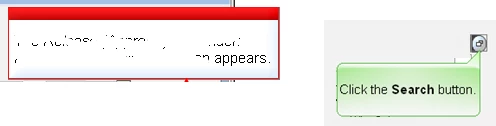
I would like to add shaded green callouts, and boxes with red bars on top to my MP4 video.

Is this possible? How can I do this?
    This topic has been closed for replies.
    Correct answer Lilybiri

    Use a video editor like Premiere Pro, that is a first possibility.

    A possible workaround in Captivate: play the video (with the highest quality possible) and capture it as a Video Demo project (cpvc extension). Then you'll have the video editor that allows you to add static objects like shapes (for text),highlights.It also allows to trim, to pan/zoom, to have transitions between video clips. You can add titles etc... But know that MP4 is a compressed format, which means you'll need very good quality to end up with an affordable video.

    2 replies

    Inspiring
    December 14, 2016

    Hi New_Guy,

    Not easily, as you would need to host the videos on a media server and then use the Web Object to import it AND then use Javascript to allow objects to be on top of it.

    Cheers
    Steve 

    Lilybiri
    LilybiriCorrect answer
    Legend
    December 14, 2016

    Use a video editor like Premiere Pro, that is a first possibility.

    A possible workaround in Captivate: play the video (with the highest quality possible) and capture it as a Video Demo project (cpvc extension). Then you'll have the video editor that allows you to add static objects like shapes (for text),highlights.It also allows to trim, to pan/zoom, to have transitions between video clips. You can add titles etc... But know that MP4 is a compressed format, which means you'll need very good quality to end up with an affordable video.

    New_guy1
    New_guy1Author
    Inspiring
    December 14, 2016

    Hi Lily:

    I inserted the video into a blank project and the video is not moving.  I just see the first frame for the duration of the slide. Even when I stretch the duration in the timeline.  My MP4 never seems to display the entire content.

    .

    Lilybiri
    Legend
    December 14, 2016

    How did you insert the video: as event video or as multislide video? How did you test?

    Maybe it didn't use the correct coded, try to open the Adobe Media Encoder and convert it to MP4 there (H264).

    This is a different question from the title in this thread.
