Multi Clickboxes on Single Slide: Pause Movie, Play Audio
Hi,
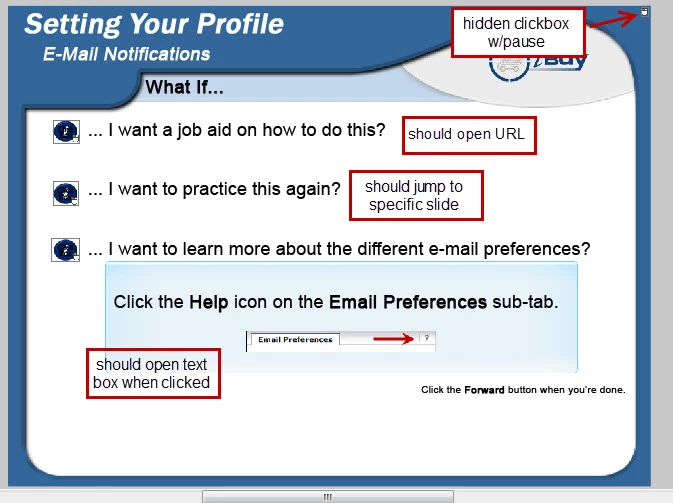
I'm using Captivate 5. At the end of each module, I have a slide with several clickboxes on them. Ideally I want the audio to continue play (9 seconds) while users can click on each option multiple times (except for the one that jumps them to a different slide). In some cases, as below, I want a text box to appear, which I've set up using Advanced Actions.
Currently I have all the clickboxes with "Continue Playing This Project" de-selected. I also have "Pause project until the user clicks" de-selected for all of them.
All the clickboxes appear at the beginning of the slide and continue until the end.
There is a hidden clickbox that ideally should pause the project at the end of the slide until they click the Forward button. For that one, I have selected the option "Pause project until the user clicks" and have the pause time set up at the end of the audio.
Right now, if a user tries to listen to all of the audio, and clicks, the project continues to the next slide after the first click. If the user begins to click before the audio is complete, then the audio stops and the project pauses.
I have already tried the following:
- If I select "Continue Playing This Project", the audio plays fine, but the project moves to the next slide after the first click.
- If I try to stagger the clickboxes on the timeline and select "Pause project until the user clicks" for each clickbox, the project, and therefore audio, stops at the end time of each clickbox. The user then has to click the Play button.
- If I stagger them on the timeline, and de-select "Pause until the user clicks", they are disabled too soon, and the user can't click on them multiple times.
Can I make this happen?
 AdChoices