Known Participant
November 30, 2015
Answered

Multi-state smart object buttons sometimes remain in over state.

  • November 30, 2015
  • 2 replies
  • 389 views

I have created many multi-state smart shape buttons (Cap 9, not a responsive project). All the buttons perform the desired actions, however they will sometimes remain in the Rollover state even if the cursor is no longer over the button. The error seems to happen when one moves the mouse rapidly from one button to the next without clicking. Is this a known issue? Does anyone have a work around or solution? Thanks for any help!

    This topic has been closed for replies.
    Correct answer RodWard

    Thanks Rod,they did with the CleanPreferencesWin.bat file. (I made sure, not my first rodeo )

    I have noticed that the issue mainly occurs if one moves his cursor rapidly over multiple buttons. I use a trackball and have a bad habit of moving my cursor quickly. I had a colleague test a exe publish with her standard mouse and she did not experience the effect until I asked her to deliberately move the cursor rapidly.

    Here is a screenshot displaying the defect.

    The lighter blue is the normal state and the darker blue is the RollOver state.

    Here is the multi-state set up:
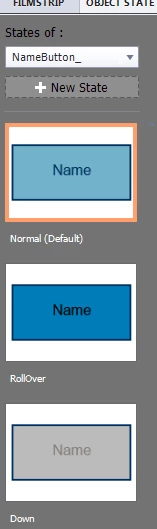
     

    All the buttons are set up the same way.


    Kurt,

    Looks like you may have discovered a bug.  I suggest you log this issue with Adobe.  I have no quick fixes I can offer.  I think you are correct that the issue is caused by the speed with which you are accessing the objects. The browser is detecting the mouseover event but seems to be missing the mouseout event that follows immediately thereafter.

    Does this happen with other browsers?  You may find that it is just IE that has this issue.

    2 replies

    Known Participant
    December 1, 2015

    Update:

    I have created brand new smart shape buttons from scratch and I am still experiencing the same issue. The only thing I have not done is install the hotfix, My new company is tight fisted with admin rights so I need to wait for the help desk.

    Known Participant
    December 1, 2015

    Update: 2

    Help desk applied the Hotfix and no change. I reported the bug to Adobe but if anyone has a solution in the mean time it would be very helpful!

    RodWard
    Community Expert
    Community Expert
    December 1, 2015

    If Help Desk did not reset your Preferences folder after the update, I suggest you should do that as well.

    If you don't know how to do that, look at tip #8 here: Basic Captivate Troubleshooting Techniques | Infosemantics Pty Ltd

    Lilybiri
    Legend
    November 30, 2015

    I never experienced this so far, and I use a lot of shape buttons. Are you talking about the published version? To SWF or HTML (seems always to be slower)? How is it deployed: LMS or web server? Which browser is used?

    Known Participant
    November 30, 2015

    Hello. This happens in Preview in Browser (IE 11), Published SWF (viewed with Flash Player) and published as EXE. I have not tested it in the LMS as of yet. I notice if I move my cursor slowly it doesn't happen as much. Also, when it shows the RollOver shape and stays that way, I can hover over it again and it returns to normal. This only happens with smart objects I use as buttons. Any multi-states that I create for smart objects that are not buttons work fine.

    Let me know if you need more info and thanks for always being so helpful!