Participant
July 24, 2017
Question

Multiple Choice Answers Not Showing

  • July 24, 2017
  • 1 reply
  • 812 views

Hi,

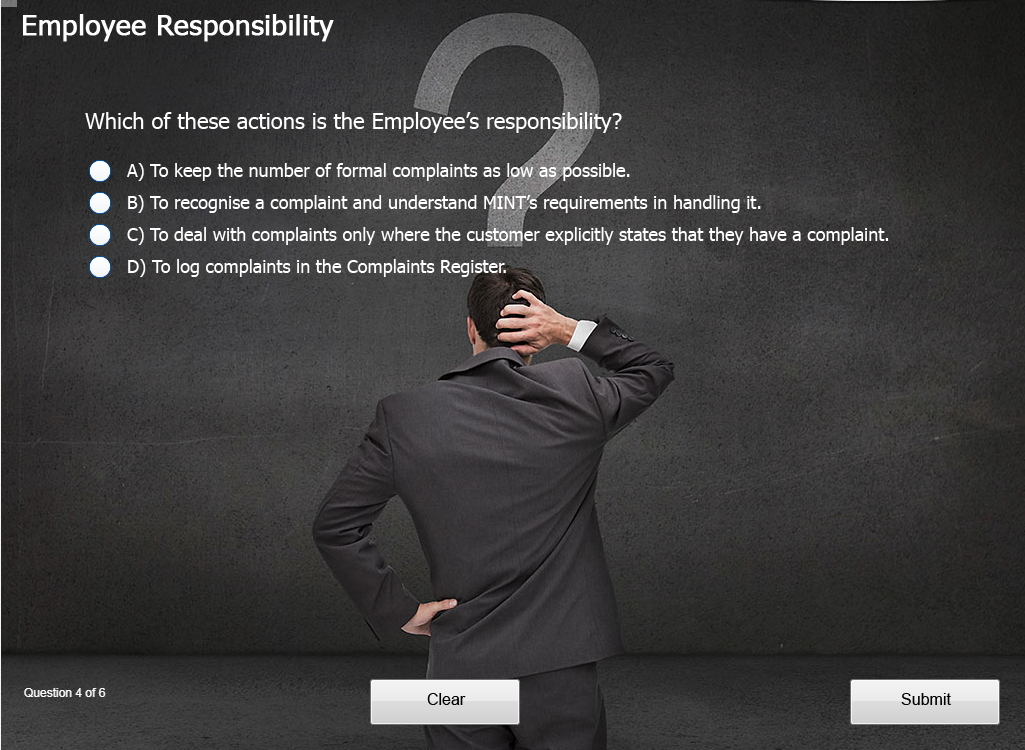
I've published a Captivate 9 module in HTML5, and everything looks OK in Captivate and when uploaded to our LMS (SumTotal) and previewed. However, some users are experiencing problems with the quiz questions in the 'live' version, as the possible answers aren't appearing. They get the background image, the question, and the A, B, C, etc. at the left, but not he answers or buttons.

Has anyone seen this before, and if so how do I correct it?

 Thanks

MattHow it appears in the LMS preview. How it appears when running the live version from the LMS.
    This topic has been closed for replies.

    1 reply

    Lilybiri
    Legend
    July 24, 2017

    Which theme are you using? It looks like a custom theme, was it created in this version of Captivate or upgraded? Can you check the object styles and the master slides?

    Please mention the complete version number: it should be the latest version 9.0.2.437

    mattb67Author
    Participant
    July 24, 2017

    Hi Lieve - thanks for the response.

    My version is 9.0.0.233 - I'll get it updated as soon as possible. As for the theme, it's actually just a blank slide with a background image on it, and I haven't made any changes to the masters. I've changed the object styles for the response captions so that they use our normal font (Tahoma), but the Question Text object style is unchanged (I made it Tahoma in the Properties area).

    I had this module running OK when published to SWF, but some users were being asked to download Flash. I therefore changed a few items and republished to HTML5, and again some users are fine with it but others (including me) are getting the missing answers on all quiz questions - they're all multiple choice. I have a couple of Knowledge Check matching questions in the module, but those work fine.

    I've tried it in Chrome and IE but get the same response.

    Thanks, Matt

    Lilybiri
    Legend
    July 24, 2017

    Since it is a Quiz slide, it uses the Quizzing master slide, not just a blank master slide. How did you add that background image: to the Main master slide, as Project background?

    You have to upgrade ASAP, that first version (you missed 3 patches) had a lot of bugs.

    Both object styles and master slides are part of the used theme, I repeat my questio about upgrading a theme or originally in this 9 version?

    Have a look at:

    What's in a Theme - a Template? - Captivate blog