
Known Participant
July 30, 2015
Question

Multiple conditional statements running consecutively

  • July 30, 2015
  • 1 reply
  • 395 views

I wonder if its possible to have a simple button have more than one conditional statement that would run one after another.

What I am looking to do is have a button on stage that when clicked, would play an audio file and then when the audio file is done, would advance to the next slide.

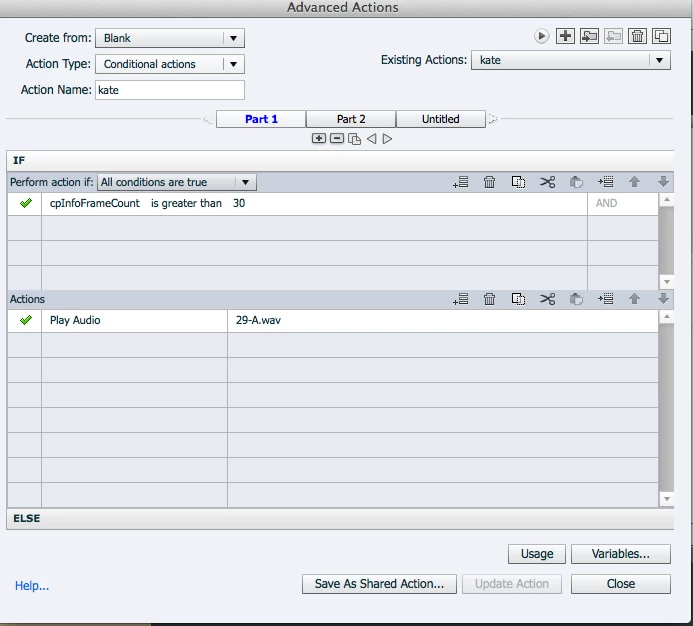
I have tried playing around with advanced actions but cant seem to get it to work. I have the audio successfully playing after the button is clicked, but not sure if there is a way to make it advance after the audio.

I am using Captivate 8

Has anyone had success with this before?
    This topic has been closed for replies.

    1 reply

    Lilybiri
    Legend
    July 30, 2015

    What is the idea to use cpInfoFrameCount in that condition? Unless your project is less than 1 second you will always have a total number of frames that is greater than 30.

    You cannot time in an advanced action, except with the timer and hourglass interaction but that is overkill here. I suppose you know the duration of the audio clip? Make sure that the inactive part of the button's timeline is the same as the duration of the audio clip (or little bit more). Use a simple action 'Play audio clip.....' triggered by the button. If you want an advanced action you have to add Continue to be sure that the play head will continue.

    kuraziAuthor
    Known Participant
    July 30, 2015

    using the cpinfoframecount was just me playing around with options. i figured by using that, it would always be true, so when they clicked the button, the event of playing the audio would always happen. I was hopeful that there would be a way to add a statement like IF its longer than 30 frames AND the audio has played THEN advance to next slide however, I did get it to work the way you suggested. Thanks for your help!

    kuraziAuthor
    Known Participant
    July 30, 2015

    Running into another problem doing it this way. In addition to have the one button that plays the audio and advances to the next slide, there will be another button that the user can click that plays audio, but it does not advance(like a quiz). I assume setting the incorrect button(the one that does not advance) to infinite attempts would stop it from advancing, but it does not. I hope this is not another bug :(