
Known Participant
June 19, 2015
Answered

Multiple slidelets on one slide

  • June 19, 2015
  • 1 reply
  • 426 views

I'm trying to display the features of a page on a slide using slidelets. I tried the zoom feature, but it was too blurry, even with a high quality image of the page.

The problem with the rollover slidelets is that the borders of the clickable areas are visible on the slidelets:
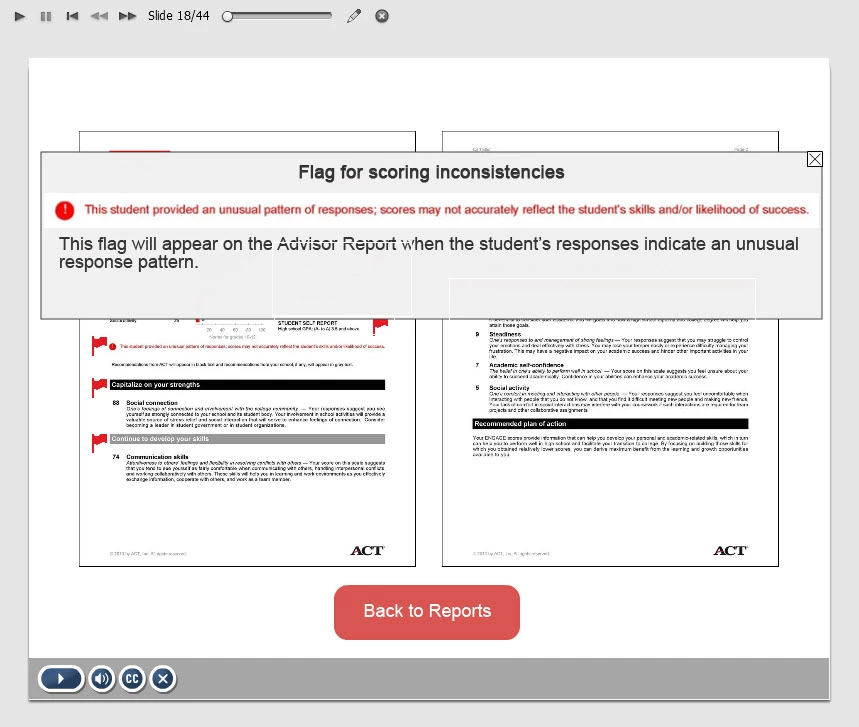
As you can see in the above image, there is a line through "Advisor Report", and below the text in another part of the slidelet. These are lines from the rollover-areas from the other slidelets on the page. This problem appears on all the slidelets, no matter what the order (which is on top) in the timeline.

here are the settings for the rollover box:
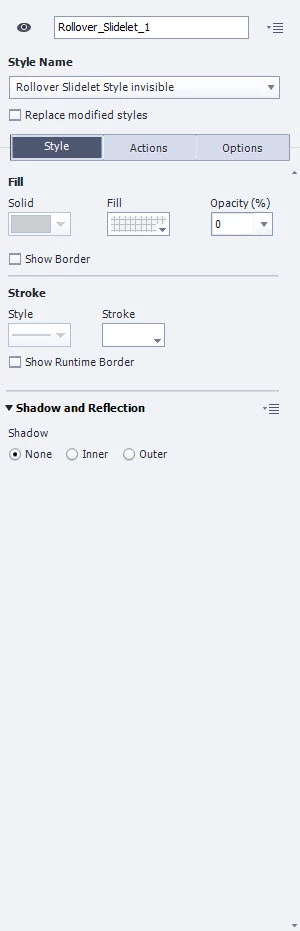
and here are the settings for the slidelet:

Could someone help me figure out what I'm doing wrong?

This topic has been closed for replies.
Correct answer Lilybiri

I always had problems when there were overlaps between slidelets, or between rollover areas and rollover slidelets. It has been a while since I used them (not possible for HTML5 output).  Did you check Preview in Browser if you have the same problem?

If not: I see that you have a stroke=0 for the border, but color is white. Can you try to make it in the same grey as the fill for which it shows? It looks bit weird, but I tend to do that even when stroke width is set to 0.

BTW: for Zoom object, you don't have to use the automatically generated zoomed in part that has mostly low quality, but you can replace it by an image with better quality.

Maybe the Zoom interaction is not what you want?

1 reply

Lilybiri
Legend
June 19, 2015

You have overlapping slidelet areas?

Known Participant
June 19, 2015

the rollover areas are all distinct, however the slidelets do overlap

Lilybiri
LilybiriCorrect answer
Legend
June 19, 2015

I always had problems when there were overlaps between slidelets, or between rollover areas and rollover slidelets. It has been a while since I used them (not possible for HTML5 output).  Did you check Preview in Browser if you have the same problem?

If not: I see that you have a stroke=0 for the border, but color is white. Can you try to make it in the same grey as the fill for which it shows? It looks bit weird, but I tend to do that even when stroke width is set to 0.

BTW: for Zoom object, you don't have to use the automatically generated zoomed in part that has mostly low quality, but you can replace it by an image with better quality.

Maybe the Zoom interaction is not what you want?