
christianb73352997
Participant
March 22, 2016
Question

Multiple Standard Styles for smartforms

  • March 22, 2016
  • 1 reply
  • 730 views

Hello,

I'm trying to set some standards for future presentations in the object style manager of captivate 9.

The created custom styles work just fine and the set of 15 or so standard styles is also present.

The real problem is, that everytime the file is reopened 4 new standard styles are generated.

Because we realised that only after a few days there are by now over 100 Standard Styles in the file.
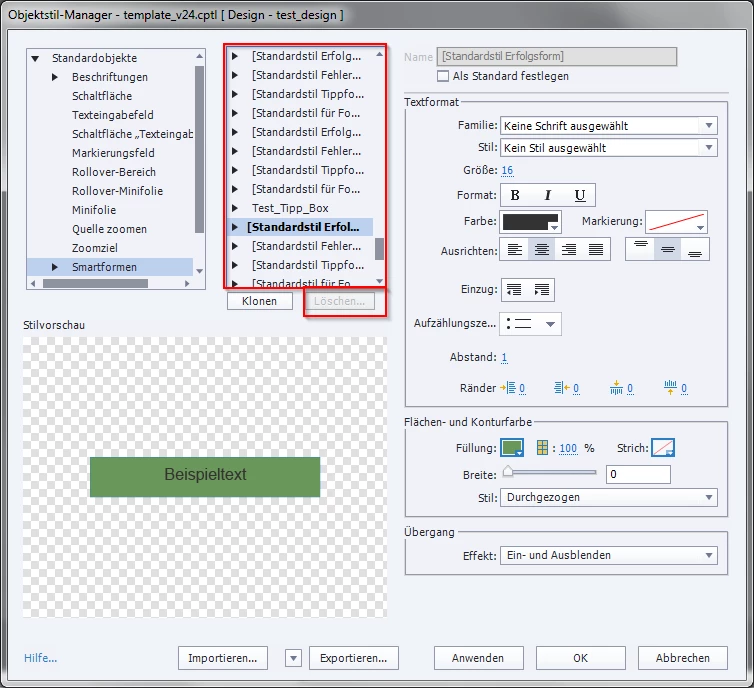
Is there a posibility to delete the duplicates?

This topic has been closed for replies.

1 reply

RodWard
Community Expert
Community Expert
March 23, 2016

I see you are using a CPTL template file.  That could be the cause of your issue.

Captivate's template files currently seem to be infested with some bugs that cause duplication of items.  There's another bad one that duplicates all Variables and Advanced Actions multiplied by the number of times each is used by any interactive object in the project.

Your bug could be something similar.

In reality I don't see any advantage in using CPTL files (considering the issues) when you can just use a CPTX file as your template by setting it to READ ONLY in the file properties.  This will mean that anytime someone uses that CPTX and tries to Save changes it will prompt them to SAVE AS instead and start a new project file.  That about all you really want from a template anyway.

christianb73352997
Participant
March 23, 2016

Thank you for the suggestions RodWard.

Unfortunately the issue must be something else.

I just started a new project as a test.

     new project --> empty project

I then counted the Standard Styles for Smartforms linke in my example above.

There where 15.

That's the first thing that suprised me. Within these 15 Styles there where: succsess, failure, tipp and "Teils richtig" (I'm working with the german version).

These 4 are repeated 3 times. Two times with exactly the same formatting (red boxes in the screenshot below), the third time with smaller text (blue box).

After Saving, Closing and Reopening the project. There where 19 Standard Styles.

That means everytime I reopen the file, there are 4 more Standard Styles.

These 4 are duplicates of the ones with the smaller text (blue box in the screenshot above).

This behaviour remains the same after reinstalling captivate to my system.

Are there any other suggestions what could be the cause of this behavoir.

Lilybiri
Legend
March 23, 2016

Did you install the patch? Most recent version is 9.0.1.320. Do not forget to clean preferences.