
Answered
Multiple Videos in a single slide
I have three videos that I am trying to run in a single slide. I have tried multiple versions of advanced actions, but they all still start at the same time when not hidden. Ideas?

I have three videos that I am trying to run in a single slide. I have tried multiple versions of advanced actions, but they all still start at the same time when not hidden. Ideas?
Does this look right? I tried it, but all the movies are still playing at the same time...I feel like I missed something...
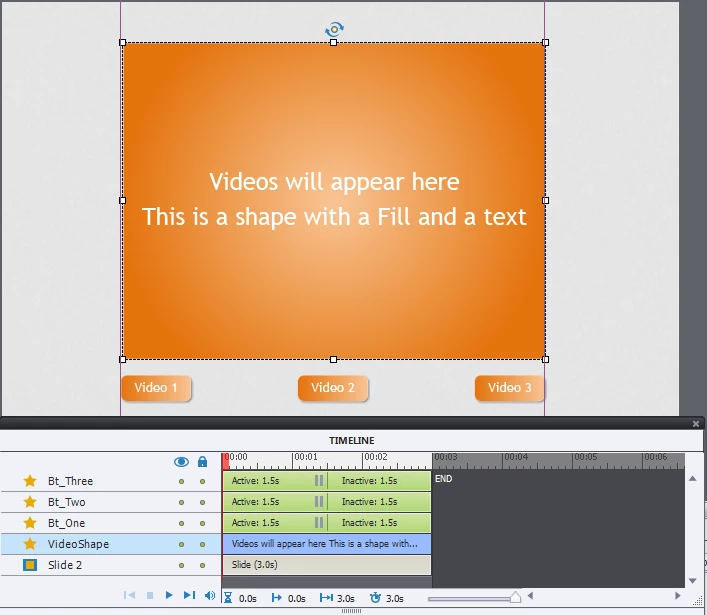
Sorry, deleted that file that I quickly assembled yesterday. You still have each video object separately on the slide, not in states! I recreated the example, here is the screenshot of the stage + timeline. The selected object 'VideoShape' in Normal state is a shape with a gradient fill and text in this example:
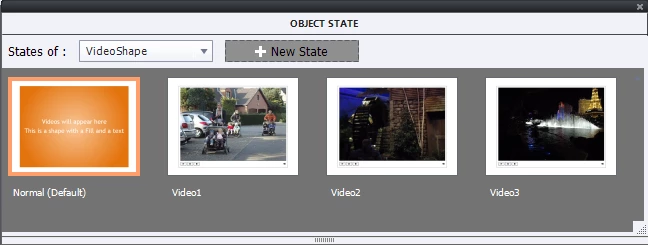
For that shape I created 3 extra states, as you can see in the next screenshot. I used the same labeling as in my previous example for the states.
Each of the buttons (Bt_One....) has to trigger the action to change the state to the proper video. Works beautifully. It will be event video!
Already have an account? Login
Enter your E-mail address. We'll send you an e-mail with instructions to reset your password.


 AdChoices