New_guy1
Inspiring
November 30, 2016
Answered

My Button "on success" Open URL or file isn't working!

  • November 30, 2016
  • 2 replies
  • 609 views

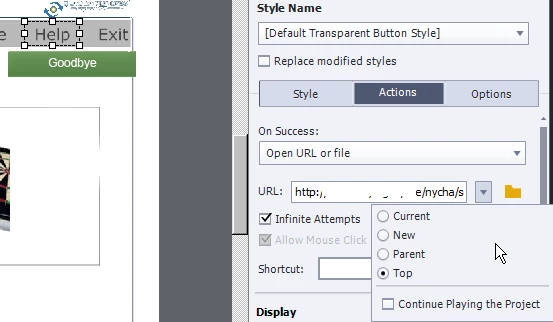
I tried "Current", "New", and "Top".  I can't get my project to open up a URL. A simple url. What could I be doing wrong?
    This topic has been closed for replies.
    Correct answer Captiv8r

    Forget about Parent and Top choices. Those only deal with link options when framesets are involved. Where are you testing from? After publishing and from your hard drive? And is the format SWF? If so, you need to add your publish location to the trusted folders for the flash player.

    This link will show you how to do it.

    Click here to view

    Cheers... Rick

    2 replies

    Lilybiri
    Legend
    November 30, 2016

    How did you test: try Preview HTML in Browser (F11). Are you sure the URL is not protected?

    New_guy1
    New_guy1Author
    Inspiring
    November 30, 2016

    Lily:

    Having more success but other strange stuff happened.

    I used F11 (What does F11 mean BTW. I usually use the File menu "publish" ) instead of Shift F12 --which is the File Menu >Publish

    My navigation buttons worked but I could only hear some clicking, not clicking with each mouse click.

    Also, Help DID bring me to my help URL in the company's internal web site.

    Lilybiri
    Legend
    November 30, 2016

    Sorry, you have two Preview methods in Browser:

    F12 = Preview in Browser, will show Flash output

    F11 = Preview HTML in Browser, will show HTML output

    You have already published, to watch the published file, you can try to do it locally but that means that you need to set up Flash trusted locations as Rick explained, and he posted a nice video explaining how to do that. The SWF output is launched using the xxxx.htm file (xxx is the same name as for the .swf file). To launch the HMTL output you use the index.html file. You'll also have another html file which launches the multiscreen file. Since a while I never use publishing to both SWF and HTML, not always working fine.

    Captiv8r
    Captiv8rCorrect answer
    Legend
    November 30, 2016

    Forget about Parent and Top choices. Those only deal with link options when framesets are involved. Where are you testing from? After publishing and from your hard drive? And is the format SWF? If so, you need to add your publish location to the trusted folders for the flash player.

    This link will show you how to do it.

    Click here to view

    Cheers... Rick

    New_guy1
    New_guy1Author
    Inspiring
    November 30, 2016

    I'm choosing publish as SWF and HTML5. It's asking me "Do you wish to view output?" I say yes.

    My help screen URL's are accessible from anywhere inside the company.

    I also tried a simple C:\NOTES.TXT file as a link and that didn't work either.

    Are you saying I should press the radio button "CURRENT"?

    I just want to link to a help URL or a HELP text file or HELP PDF text file or HELP word document I have.

    Lilybiri
    Legend
    November 30, 2016

    View output will show the SWF output. If you published to the default folder Preferences, it shoudl have been added as Flash trusted location. Can you try to view the HTML output, by running the index.html file?
