Answered
My drag images disappear when they are dropped on a correct drop target during the drag and drop interaction.
What am I missing. The opacity is at 100%. The drop target is a highlighted box from objects. I am using Captivate 8.

What am I missing. The opacity is at 100%. The drop target is a highlighted box from objects. I am using Captivate 8.
Hi there,
You might want to make sure your Depth setting is not set to Back instead of Front on your drop target(s).
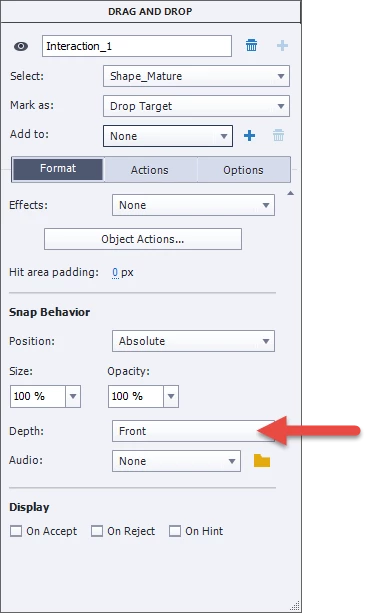
The Depth setting is accessed via the Drag and Drop window/panel under Format setting while you have your drop target selected.
If your Depth setting is set to Back, especially if your opacity is set to 100% on your highlight box/drop target, your drag image would go behind your drop target giving the effect of disappearing behind your highlight box - especially if the drop target is larger than the drag image.
Already have an account? Login
Enter your E-mail address. We'll send you an e-mail with instructions to reset your password.
 AdChoices