April 13, 2011
Question

My File is not opening after i publish

  • April 13, 2011
  • 1 reply
  • 520 views

Captivate 5

We have created a project where users should be able to click a button to open a PDF.  We used actions-Open File and included the doc.  After publishing we received the following notice
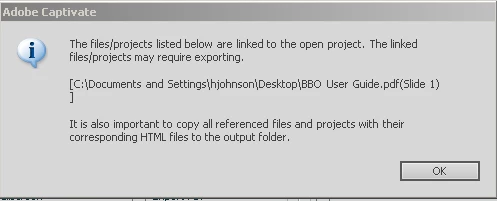
I'm sure it is because our file needs to be included in any zip folder prior to uploading to LMS.  My question is we have copied and pasted this file and zipped it all up to be uploaded but it still does not work.  Is there some code / importing /exporting or something we are missing?  I have tried looking at the html code and was able to see where it says it's pulling this file to open in the index.

Please help.  Thanks

This topic has been closed for replies.

1 reply

Captiv8r
Legend
April 13, 2011

Hi there

Where are you testing from? If local PC, check the information linked below.

Click here to view

Cheers... Rick

Helpful and Handy Links

Captivate Wish Form/Bug Reporting Form

Adobe Certified Captivate Training

SorcerStone Blog

Captivate eBooks

April 13, 2011

Rick

Thanks so much for your prompt attention, however, this message displays during publication.  The link itself does not work at all after publishing.  If you notice my shot does not show a macromedia message it is a captivate message.  Also, I would imagine somehow i have to tell the project to open "this" file.  If it is saved locally, how do i get the file to open for someone that does not have access to my local computer.

I was thinking that this file has to be attached/saved with the project...zipped and then loaded.  So when users (that don't have access to the original location of document) click the button, it will open the document.  Just not familiar on how to get the index to open that document.

Thanks

RodWard
Community Expert
Community Expert
April 14, 2011

The message box you are seeing is a standard message that is always displayed when Captivate detects that you've added a link in your project to a file

outside the project.  Even after you HAVE copied the PDF into the publish folder, this message will continue to display at each publish. If you know the file is in the correct place, just ignore it.

Another issue I've spotted when looking at the name of the PDF is that you seem to have spaces in the name.(BBO User Guide.pdf)  This is likely to break the link in an HTTP LMS web environment.  Make sure you either eliminate the spaces or use underscore characters instead.