
Participant
February 19, 2016
Answered

My playbar buttons are all spread out

  • February 19, 2016
  • 1 reply
  • 301 views

I only want a few buttons as part of my playbar, but I want them to be next to each other in either the right or left corner of the bar.  Here is how they display now:

In my skin editor, there appears to be the option to adjust the position and layout of these buttons, but these options are greyed out for me:
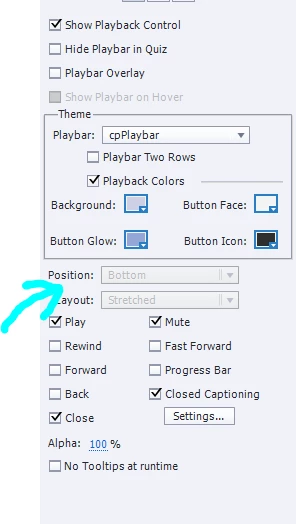
Could this be because I built it as a responsive project?

    This topic has been closed for replies.
    Correct answer Lilybiri

    Yes, because of responsive project. Try another playbar, or (better IMO) create custom buttons: CC and Audio can be toggle buttons:

    1 action = 5 Toggle Buttons - Captivate blog

    You can also combine a Play/Pause button, using Pause and Continue commands in a conditional action that you trigger with a shape button (invisible) that changes between two images or states. I don't know which version you use.

    1 reply

    Lilybiri
    LilybiriCorrect answer
    Legend
    February 19, 2016

    Yes, because of responsive project. Try another playbar, or (better IMO) create custom buttons: CC and Audio can be toggle buttons:

    1 action = 5 Toggle Buttons - Captivate blog

    You can also combine a Play/Pause button, using Pause and Continue commands in a conditional action that you trigger with a shape button (invisible) that changes between two images or states. I don't know which version you use.

    Participant
    February 19, 2016

    Thanks!  I like that idea a lot better.