
Participant
April 4, 2019
Question

Navigate Visited Slides Only option greyed out

  • April 4, 2019
  • 1 reply
  • 587 views

Hi

I'm at a total loss as to why the 'Navigate Visited Slides Only' option in my Captivate 2019 course is greyed out leaving me unable to interact with it. Basically if I click 'Enable Navigation' (which I want to use), the 'Navigate Visited Slides Only' option ticks and remains grey.
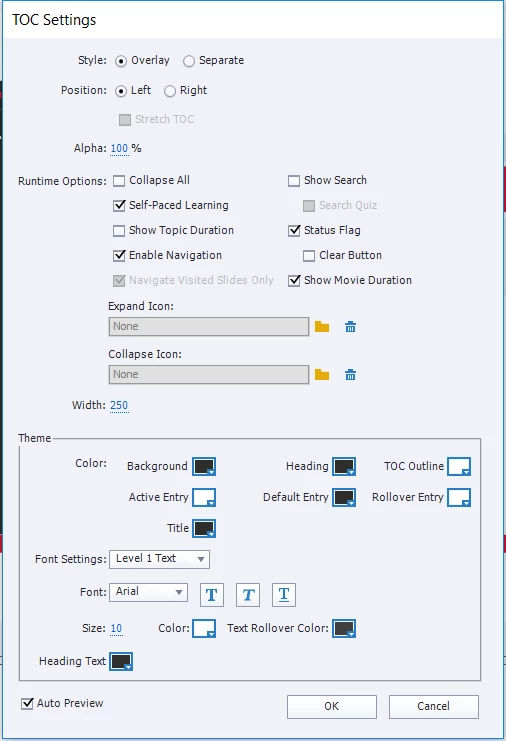
I've read online that this may be due to a preferences corruption but the issue has never been resolved and no one has ever offered a work around.

Is there anything I can do to resolve this mystery as its creating a massive problem.

Thanks in advance for any help or guidance offered.

    This topic has been closed for replies.

    1 reply

    Lilybiri
    Legend
    April 4, 2019

    Which version are you using, please (full version number as shown under Help, About Captivate)?

    Is this a non-responsive or a responsive project? Do you have quiz slides? If yes, what is the option for 'Required' field chosen?

    Participant
    April 4, 2019

    I'm using Captivate 11.0.0.243.

    This is a responsive project with quiz slides. The setting 'Required' in the Preferences under Quiz > Settings is configured to 'Optional - The user can skip this quiz'. Hopefully that give you a bit more detail.

    RodWard
    Community Expert
    Community Expert
    April 4, 2019

    Captivate 11.0.1.266 is the current version.  Might be good to update your install just in case that issue has been sorted already.