Navigation Freeze Issues - Captivate 6
Hello,
I have a unique situation happening with a simulation project where I jump to a certain slide that has sub navigation and when the users clicks on the sub topic the project freezes from anywhere from 7-12 seconds. Once the subsequent page displays there are three buttons they can click on to jump to a section. When they click on one of these buttons the system freezes again but then does not progress. And it then renders the buttons nonfunctioning. This same project will randomnly display the black loading icon across the middle of the project as well and never disappear. You can still use the CBT but rollovers are disabled. Finally when the issue happens it will also randomnly not play audio that has been imported tot he slide.
Specs
- Version - Captivate 6.0.1.240, have been advised by Adobe that I can't apply the patch as I have a perpetual license. But did try in 7 so I believe I'm thinking it's not patch related.
- Project publish size - 30 mbs
- Audio - Yes, on 80 slides
- Slide Amount - 280 - I know this is a large file, the majority of it is made up of 10-15 page software simulations for about 20 different topics. The remaining 50 pages would be "designed" pages that contain images, text, rollovers, navigation buttons and such. I have a 218 page project that has pretty much the exact same specs
- LMS - SABA - The issue happens when publishing to our LMS or just publishing to a Web server
Troubleshooting so far
- I thought it may be related to the distance the project had to "jump", so I moved the problem section closer to the menu slide and that did not help.
- I had the menu jump to a different page thinking that was the issue. No success
- Published in Captivate 7 Demo. No success
- Had co-worker publish. No success
Still to try
Splitting file into 3 seperate chunks
I use the Hint Caption functionality on alot of the buttons. I wonder if I've used too many?
Project uses the Glossary learning interaction - Will try removing that and making it a link
Enable the Captivate Table of Contents and remove my custom navigation
Supporting Image
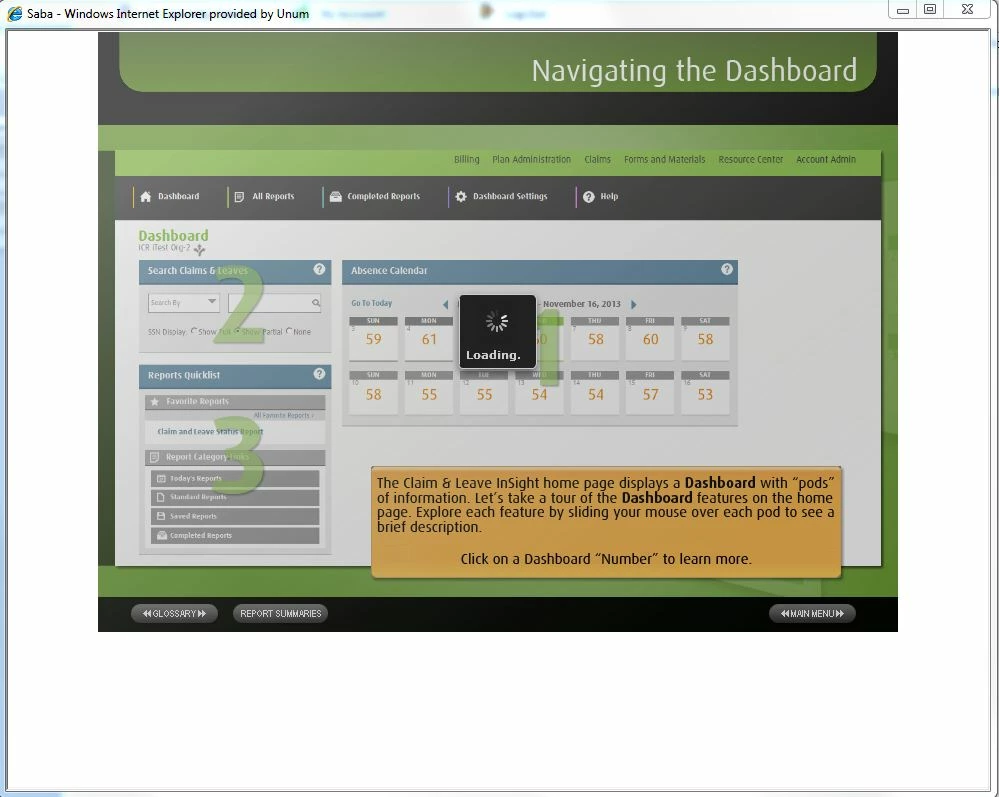
This loading image with the gray overaly NEVER disappears. Some of the buttons will work also randomnly work with this image the way it is. For example I could click Main Menu and have it jump there, but other times I could click on it and it does nothing.
Help!!! I apologize about the "randomness" of everything, I know it makes figruing it out that much harder. I will update this post with progress on those other issues I still have to try as well.
This project has already past deadline and I really don't want to have to recreate it.
Matt
 AdChoices