


Participating Frequently
February 23, 2010
Answered

Need help with bullets in Captivate 4

  • February 23, 2010
  • 1 reply
  • 1309 views

Hi Everyone,

I am using Adobe Captivate 4.

Is there a way to use a square bullet in the caption box? Captivate does not give an option/choice for different bullet types & has only 1 bullet type (round bullet)

My project requirement needs solid square bullets .... I tried using Windows charmap utilty to insert a symbol and then use it as a bullet...though it came in perfectly, it would not align properly with the text 😞

Screenshot attached for your reference:
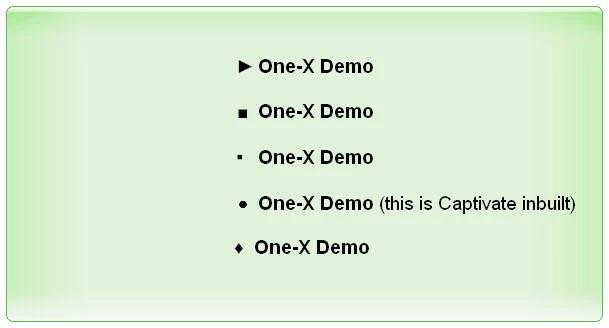
The 4th bullet is Captivate default....I want the square bullet as shown in 2nd line, with proper alignment with text.
Is there a better (and easier) way to do this?

Thanks in advance for your help.

    This topic has been closed for replies.
    Correct answer Captiv8r

    Hi there

    Try creating the bulleted list in Microsoft Word. Make it look as you desire, then copy it and paste it into the caption.

    Cheers... Rick

    Helpful and Handy Links

    Captivate Wish Form/Bug Reporting Form

    Adobe Certified Captivate Training

    SorcerStone Blog

    Captivate eBooks

    1 reply

    Captiv8r
    Captiv8rCorrect answer
    Legend
    February 23, 2010

    Hi there

    Try creating the bulleted list in Microsoft Word. Make it look as you desire, then copy it and paste it into the caption.

    Cheers... Rick

    Helpful and Handy Links

    Captivate Wish Form/Bug Reporting Form

    Adobe Certified Captivate Training

    SorcerStone Blog

    Captivate eBooks

    Participating Frequently
    February 24, 2010

    Thanks a ton Rick!!

    That worked! ....and it looks great!