This question has been answered many times in this forum.
You need a user variable for each of the click boxes, which will be a Boolean variable, default value = 0. It will be changed to 1 when clicking on the click box. I suspect that you want to leave the click boxes enabled when they have been clicked? If not, it could be a simpler solution, let me know.
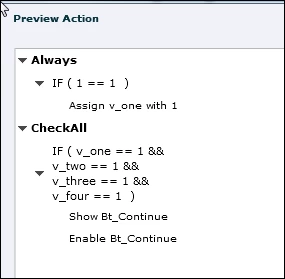
Create the Continue button and make it invisible for Output (eye button in its Properties panel). Create an advanced action for each of the click boxes, that will be a conditional action with two decisions:
First decision 'Always' is a mimicked standard action (with the condition 'IF 1 is equal to 1' which is always True), assigns the value 1 to the appropriate variable and does eventual something else that you want to happen when the click box is clicked
Second decision 'CheckAll' will test if all the variable are set to 1 (combination of conditions with AND) and then show the Next button. Here is a preview of such an action, for the first click box, I have only 4 click boxes, but it is easily edited for more. For the other click boxes you only have to change the variable in the first decision (and eventually another command if the click box has to do something).



 AdChoices