
Inspiring
January 9, 2018
Answered

Need to have a second action on a Button

  • January 9, 2018
  • 1 reply
  • 504 views

I am attempting to create an advanced action that will allow two simultaneous rollover / hover actions on a single Button.

Effectively I need two actions to happen simultaneously when the button is rolled / hovered over.

  1. The preconfigured rollover state of the button itself needs to remain intact. (Color changes to Green on rollover. Yellow on visited)
  2. I need an additional rollover / hover action in the form of a text callout. (This needs to happen during any state of the button)

When adding an additional Rollover Object on top of the Button; the two actions, Button and Rollover Object, will only work independently on playback regardless of their arrangements on the timeline.

Perhaps an advanced action is not necessary however my numerous attempts from the timeline and Advanced Actions have "hit a wall".


All advice is welcome and appreciated
    This topic has been closed for replies.
    Correct answer Lilybiri

    You cannot stack a rollover on an interactive object, because a rollover area is sort of a hybrid interactive object. Moreover, rollovers are not supported for HTML5 output, they will not work on mobile devices. Rollover is not an 'event' for a button like it is for a rollover slidelet.

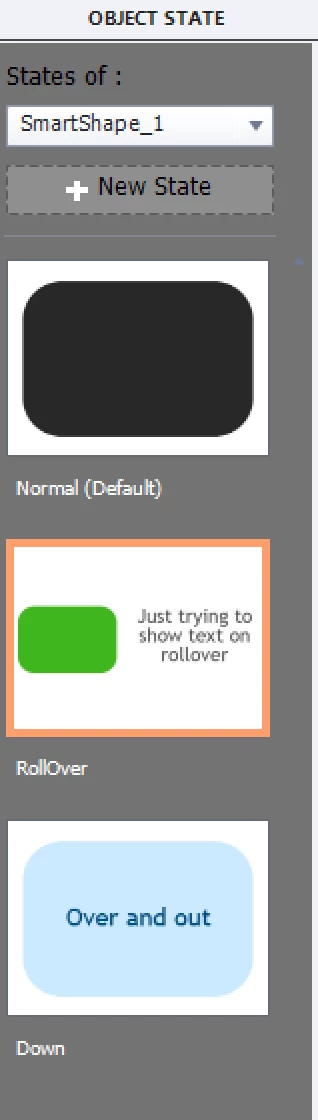
    It could be that I don't understand your question quite well. It is possible to add a text caption to the InBuilt rollover state. Did you try that? Here is a screenshot of the states of a shape button, where the rollover state has such an added text caption.

    1 reply

    Lilybiri
    LilybiriCorrect answer
    Legend
    January 9, 2018

    You cannot stack a rollover on an interactive object, because a rollover area is sort of a hybrid interactive object. Moreover, rollovers are not supported for HTML5 output, they will not work on mobile devices. Rollover is not an 'event' for a button like it is for a rollover slidelet.

    It could be that I don't understand your question quite well. It is possible to add a text caption to the InBuilt rollover state. Did you try that? Here is a screenshot of the states of a shape button, where the rollover state has such an added text caption.

    Inspiring
    January 9, 2018

    Hello Lilybiri,

    Yes I had come to realize, through trial and error, that stacking a rollover on an interactive object may be impossible.

    Your advice of Overlaying text on the "State" of the Object is a fantastic workaround though.

    I had no idea that the "In Built States" could be edited as a Slide ! ! !  It was not so apparent to me

    This is awesome and the solution fits well for my project.

    Many thanks

    Lilybiri
    Legend
    January 9, 2018

    InBuilt states and custom states are much more powerful than most users think.  I really prefer to use Shape buttons, because you can edit the label in the shape instead of having to go to the Properties panel to find that label.