


Inspiring
April 28, 2022
Question

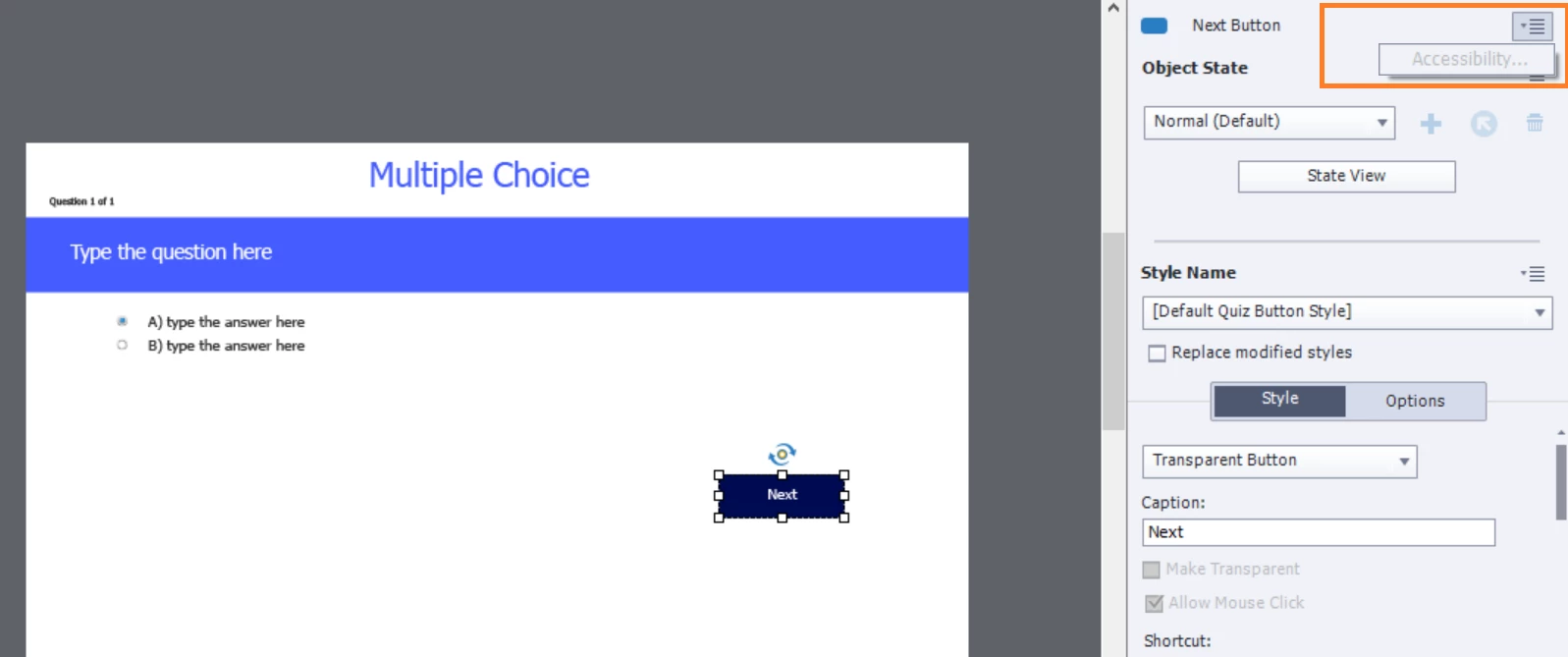
Not possible to include 'Accessibility' text for 'Next' button in Quiz

  • April 28, 2022
  • 2 replies
  • 209 views

Hi, 

Please suggest why I am not able to add 'Accessbility' text for the 'Next' button in Quiz. I would like to add the accessibility text for the 'Next' button so please guide me, thanks!
 

    This topic has been closed for replies.

    2 replies

    Lilybiri
    Legend
    April 28, 2022

    Hmm.... the screenshot shows a 'messed up' question slide.  

    Since you have a Next button styles with the Quiz button style, it looks like you activated 'Submit All', but I don't see the Submit All button which means that you have deleted the most essential button on this slide.

    What I mean by 'messed up': you deleted embedded objects from the question slides or - worse - from the quizzing master slides.  All functionality of the quiz, including reporting, depends on those embedded objects. Some can be deactivated, but there is no way to add an embedded Next button with the default Quiz button style unless you use Submit all.

    Inspiring
    April 29, 2022

    Hi, 

    I didn'r remove the 'Submit All'. I have moved that button below to the working area. In my course I have 15 quizzes, I wanted to enable the 'Submit all' after all 15 quizzes since I have given the previliege to the learners to change their responses before clicking 'Submit All'. 

    If I understand well, I cannot customize the accessibility text for default quiz button such as like 'Next' button?


    Thanks!

    Inspiring
    May 6, 2022

    Hi team,

    I have managed it somehow. 


    Thanks!

    RodWard
    Community Expert
    Community Expert
    April 28, 2022

    The accessibility options are not available for certain quiz question elements.  That's why the option is greyed out (disabled) in your screenshot.  As far as I know there is no way in Captivate to activate that option for these elements.