
chrismay_at_delta6226261
Inspiring
October 5, 2018
Question

.oam and audio files on slide

  • October 5, 2018
  • 2 replies
  • 344 views

I just found an interesting feature/bug in Captivate 2017.

If you have audio on a slide, and a have added a .oam file (HTML5 animation from Adobe Animate). The audio ends up controlling when the animation starts and stops.

The .oam will not play until the audio is playing, and the .oam will stop when the audio stops. If you look at the screen shot below, the .oam is on the slide timeline from the first frame to the last. The audio starts at 3 seconds and ends around 43 seconds.

This means that the .oam animation will also start at 3 seconds and end around 43 seconds.
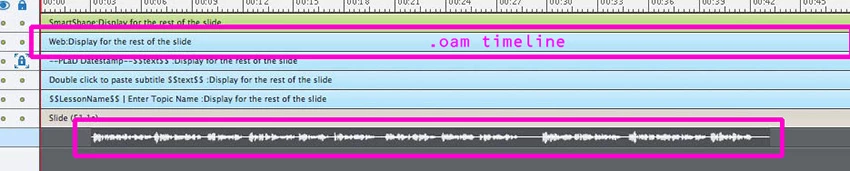
The workaround is to extend the audio file to be equal to the length of the slide.

    This topic is closed to new replies. Start a new post to keep the conversation going.

    2 replies

    chrismay_at_delta6226261
    Inspiring
    October 8, 2018

    The .oam does set one user variable in Captivate. But nothing to stop or start the parent.

    If I remove the audio, then everything plays as expected. Add the audio back and the .oam only plays when the audio is playing. If I add enough silence to extend the audio for the full length of the slide, then the .oam plays as expected.

    TLCMediaDesign
    Inspiring
    October 5, 2018

    Is it possible hat there is something in the oam file that is referencing a parent?