
Participant
August 1, 2019
Question

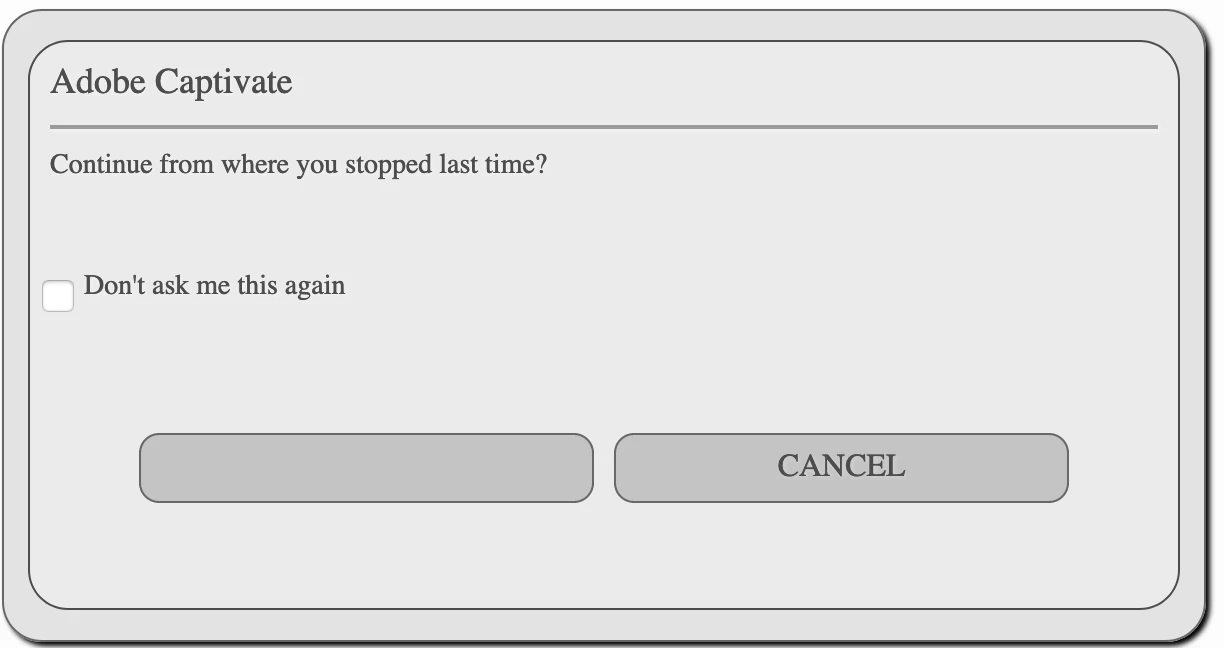
OK button text not showing on "Continue from where you stopped last time?" pop up

  • August 1, 2019
  • 2 replies
  • 739 views

Hi,

I have been using Captivate for quite some time, but new the forum.

I have selected 'Self-Paced Learning" in TOC for some of my courses to allow users to resume a course where they left off.

When the "Continue from where you stopped last time?" pop up appears the text "Cancel" appears on the right button but the text "OK" is missing from the left hand button. The button still works, but the text is missing.  I am attaching the image below.

I tested in all browsers and it still appears....has anyone else experienced this/solved it?

Thanks,
Kristina
    This topic has been closed for replies.

    2 replies

    Lilybiri
    Legend
    August 2, 2019

    I have seen this bug mentioned before, but not recently. Can you tell which version you are using, please. You find the full version number under Help, About Captivate.

    You can style the popup box (which only appears when using bookmarking by TOC) in the Object Style manager. But i suspect that you missed a bug patch.

    Participant
    August 2, 2019

    Hi Lilybiri,

    Thank you so much for replying so quickly.  I have referenced your work so many times over the years....you are like a celebrity in my house! LOL.

    I am running Captivate 2019 version 11.5.0.476.  I have the latest update.

    I figured out a workaround by manually adding some code into the index file after publish that changes the colour of the buttons, but it is not too efficient!!

    I am thinking you are correct that i missed a patch--but not sure how I could go about finding/fixingf it?

    Many thanks,

    Kristina

    LuisXIV
    Participating Frequently
    August 1, 2019

    Hello Kristina,

    The question is not to clear to me, but let try to figure out what is going on.

    Step 1 - Was the learning object properly close.

    Step 2 - There is a setting in the LMS for bookmarking, at least in most of them.

    see image 1

    The end of object marker is for the score. The Bookmark setting is what you need.

    Image 2: I stop the learning object and close the lms.

    image3: Re-open the learning object  and continue were I left the lesson.

    Double check all the setting, clear the cache in Captivate and the browser or maybe there is a corrupted file.

    Participant
    August 2, 2019

    Thank you so much for taking the time to reply.

    The LMS is not the most intuitive --it appears bookmarking is applied to all courses--there is no way to set by individual course.   So, I used bookmarking in Captivate through TOC.

    I tested across browsers, cleared cache etc.--but no luck.

    I am thinking Lilybiri is correct and I missed a patch?

    Thanks again!

    Lilybiri
    Legend
    August 2, 2019

    Don't think so since you use the most recent release. Did you try to edit the popup window in the Object style manager?