
One button Toggles object visibility and hides multiple others
Greeting Captivators!
I have created an interactive seating chart as part of a new hire orientation course.
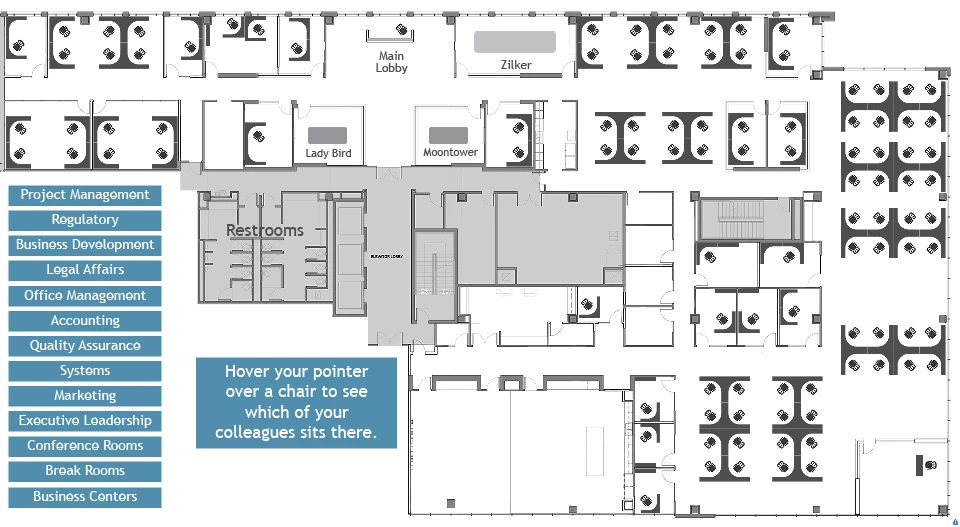
The desired function = user clicks a Department button (multi state Normal and Active) and the following actions happen:
- Change state of Department button to Active
- A semitransparent shape (highlight) appears over the floor plan representing where that department is located.
- Change state to Normal for all the other Department buttons.
- Hide All other highlighted areas
Each button toggles Normal and Active and the corresponding highlight toggles Show/hide. For example, User clicks Systems, the Systems button toggles green (Active) and the location of the Systems team toggles to highlighted (Show). Then user clicks Break Room, Systems button toggles to blue (Normal), Systems highlighted area toggles to Hide, Break Room button toggles to green (Active), and Break Rooms highlights are toggled (Show).
It all works! Well...almost. It works the first time. What is happening is when you click from Button A to Button B, to Button C - it all works as designed. However, when you click from Button C back to Button A, there is a dead click. Button C and its highlight toggle, but Button A and highlight do nothing. A second click produces the desired response.
I don't want that 2nd click. How do I avoid it. Here is my project link.
Dropbox - interactiveFloorPlan
Thanks for any help you can offer.
-Dave


 AdChoices