



Answered
Open URL not working correctly
I am building an exam in Captivate 9, and on certain screens I need the learner to view an image. Since my options are limited, I am using a shape with the "Open URL or file" option.
This works fine when the URL contains no spaces, but when the URL has spaces Captivate inserts additional text into the URL, and then it does not work.
For example, I enter this URL in Captivate, 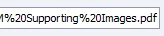
and Captivate changes it to this incorrect URL at runtime, 
Note that it changes the %20 to %2520, which of course does not work.
Has anyone else run into this? Adobe, is there a reason for this?
Obviously the easy solution would be to remove the spaces, but I don't have access to this website.
Thanks.

 AdChoices