


Known Participant
December 2, 2020
Answered

Opening a file in a new window

  • December 2, 2020
  • 1 reply
  • 806 views

Hello,

I have another captivate exercise that opens in a new window. When I publish to the LMS, the behavior is the when opening the file the main course 'kicks' down to the task bar when the window opens instead of the exercise file opening in another tab. Is there another setting I should try?

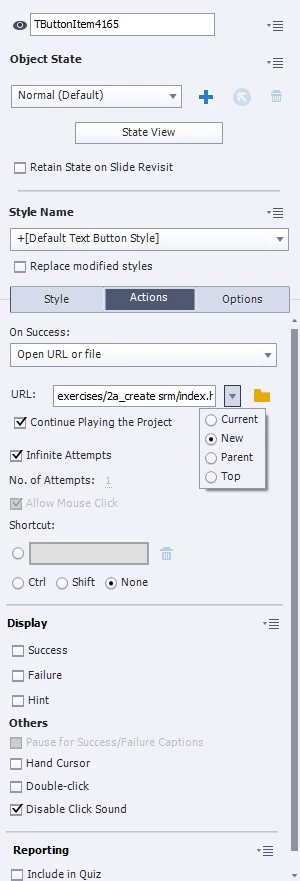
The browser settings (edge) allow pop ups from the LMS. Here's a picture of the settings:


    This topic has been closed for replies.
    Correct answer TLCMediaDesign

    You'll need to execute JavaScript to open a sized window. Change the dimensions width and height. It's best to put your file to be opened in the callees folder


    window.open ("callees\index.html","mywindow","menubar=0,resizable=1,width=350,height=250");


    1 reply

    Paul Wilson CTDP
    Community Expert
    Community Expert
    December 6, 2020

    Try deleting the system path and only have the filename displayed in the URL field. Once you have published both your projects, copy the published unzipped secondary project folder to the callees folder of the primary published project. Keep in mind that the secondary project will not communicate results to your LMS and your learners may need reminding to return to the original project if this is necessary to complete after finishing with the secondary project.

    Paul Wilson, CTDP
    Known Participant
    December 10, 2020

    Thank you for response!

    I tried it that way and it 404'd out. I also tried just dropping the exercises in the root and it still 'kicked' the main training down to the task bar.

    We've had similar problems like this in Articulate. It seems to resolve when we set a custom window size that opens in a new window, but I don't see that option in Captivate.

    TLCMediaDesign
    TLCMediaDesignCorrect answer
    Inspiring
    December 10, 2020

    You'll need to execute JavaScript to open a sized window. Change the dimensions width and height. It's best to put your file to be opened in the callees folder


    window.open ("callees\index.html","mywindow","menubar=0,resizable=1,width=350,height=250");
