


Known Participant
September 6, 2023
Question

Overlay in New Captivate

  • September 6, 2023
  • 2 replies
  • 3974 views

Is the overlay feature in New Captivate only avialable through the bookmark feature? I can see thats how the overlay feature is used in one of the demo's that Captivate offers.

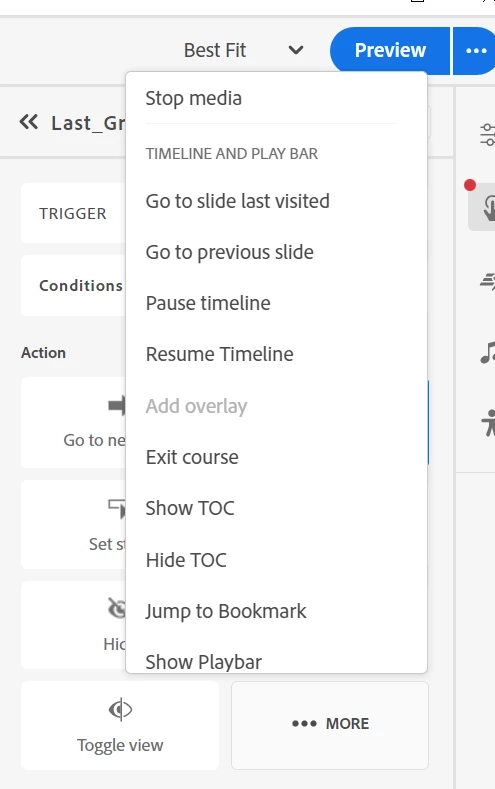
I'm trying to set up a function where a user clicks an image and then opens up an overlay. But so far the overlay feature isn't an option to click. See picture below.

Does anyone know a work around for this? Or does anyone know why this may be occuring?
 

    This topic has been closed for replies.

    2 replies

    Community Manager
    September 8, 2023
    Lilybiri
    Legend
    September 8, 2023

    @Saurav_Ghosh Sorry, but Help page you are pointing at is about an interactive video. The example from one of the Quick Start Project has no slide video, it is an overlay on a static slide. Please, try to avoid confusion in the Help documentation which is already very limited. It is necessary to explain the steps needed on a slide with static blocks like this one. For previous versions I have been adding documentation through my blog, but due to many reasons (like stealing my ideas and lack of appreciation by... and lack of promised fees for many hours of work), will not do this for Charm. 

    Just my concern for the users, which I still try to help whenever possible in this forum and in other social media.

    @New Name Michael I will try to give you a step-by-step explanation once my copy of Charm stops crashing and I can retrieve this Quick Start Project. I need to see the Timeline which is not visible in your screenshot. It is a slide interaction but I want to see the location of Bookmark which is referenced to.

    Lilybiri
    Legend
    September 7, 2023

    If you pointed out the 'demo' where you did see an Overlay, it would be easier to explain.

    One of the limitations in responsive projects created with the new version, or with fluid boxes in Captivate Classic is that you can never stack two items. I think you want to do this, but it is impossible.  The workaround is to use a multistate object and use an action to change the state.  You need to cope with many limitations due to the choice for responsive projects. This is a breeze in Captivate Classic when you create a non-responsive project.

    Known Participant
    September 7, 2023

    That's what I figured. It shows up as a slide, will likely use a different slide instead. Below is what it looks like in the demo.


    Lilybiri
    Legend
    September 8, 2023

    OK, finally was able to open that QSP.

    For the reasons I explained in my other answer, I will not post the step-by-step here.  I will send you a private message. Check it out.