


Participant
August 12, 2022
Question

Parenthesis missing on multiple choice questions in Question Pool

  • August 12, 2022
  • 1 reply
  • 99 views

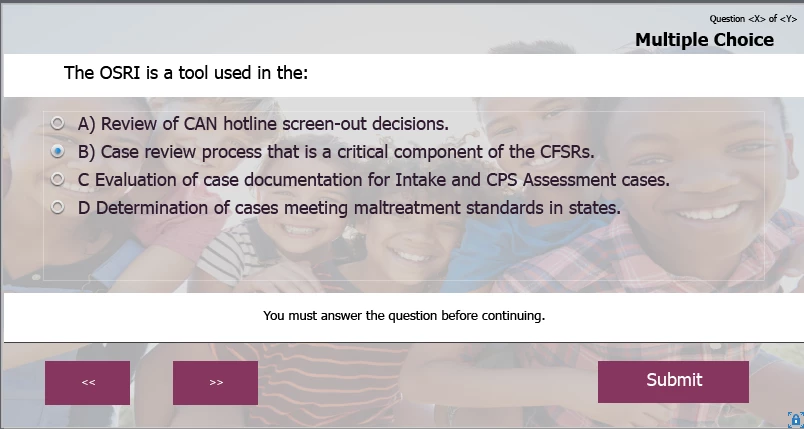
I created a question pool and the background is set using Master Slides. For some reason when the quiz runs the last two options do not show a parenthesis after the letter.  On the Master Slide, it only shows two options so I don't know if this is why, but it won't let me add additional options on the slide master. I cannot seem to edit anything on the slide master.

This is what it looks like after the test is generated:
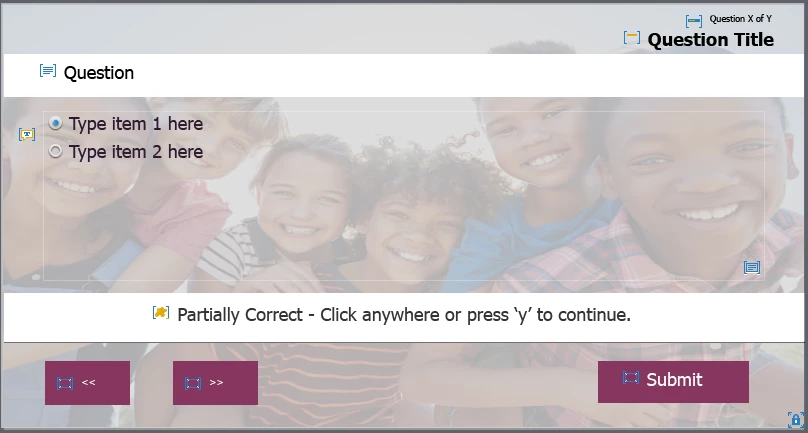
This is what the Master Slide looks like. Why can't I edit the Master Slide options to increase it to 4 choices instead of two?


    This topic has been closed for replies.

    1 reply

    Lilybiri
    Legend
    August 12, 2022

    You cannot add answers on the quizzing master slide. One of the reasons may be that the intdividual answer captions are not visible on the master slide, you only have the answer area which is the surrounding area for all answers.

    If you plan to have more answers, or longer answers, I would always recommend to increase th size (height) of the answer area, and decrease the other areas to allow that.  You didn't specify if this is for a responsive or a non-responsive project, because it is slightly different in responsive project where you need to edit the fluid boxes.


    Number of answers needs to be specified for each question in the question pool. There is no direct way to do that on the quizzing master slides. BTW all quiz and knowledge check slides always are based on quizzing master slides.


    However an alternative, which I recommend warmly, is to always use either the GIFT or the CSV import for quiz slides, which is only possible for real quiz slides, not for Knowledge check slides. But you are using a question pool which also allows that import. That way the number of answers will automatically be as specified in the GIFT or CSV file.

    Participant
    August 12, 2022
    Thank you. I did use a GIFT file and there are four answers on each slide. I’m not sure what I need to adjust in order to get the parenthesis to show up. There is already plenty of room for the four answers.

    Get Outlook for iOS<>
    RodWard
    Community Expert
    Community Expert
    August 13, 2022

    If you are adding questions using GIFT import, you simply have to accept that you will also need to go back to each question and do some tidying up of the formatting.  In the case of the formatting of the question answer numbering for example, you will need to select all of the answers and reset the list style formatting in the Quiz tab.