Known Participant
March 16, 2018
Answered

Partial Correct Actions on multiple choice quiz questions

  • March 16, 2018
  • 1 reply
  • 725 views

Greetings!

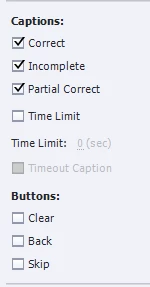
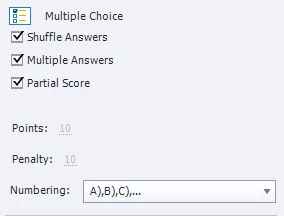
I have a multiple choice question slide with partial scoring and captions for Correct, Incomplete and Partial Correct answers.

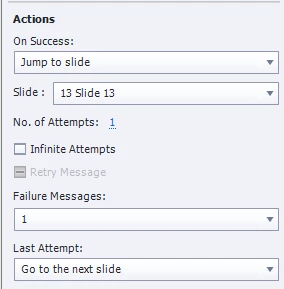
At the end of the question, I have 2 possible actions:

On Success: This jumps to slide 13 (the next question)

Last Attempt: This goes to next slide (a feedback explaining the answer)

When the learner gives the good answer, it does jump to slide 13. When the learner selects at least one bad option, it does go to the next slide, as intended.

However, in the "Partial correct" case where the learner selects some of the good answers, but not all of them, and no bad answer, the "On Success" action is chosen, instead of the "Last Attempt" action. This is an issue for me because I want people who missed some of the answers to see the feedback slide where everything is explained. Is there any way to remedy that? I'd rather not have to redo everything as a custom question slide just for that detail.

Thank you very much.

Have a nice day everyone!

Here are a few screnshots of my settings if it helps:
This topic has been closed for replies.
Correct answer Lilybiri

That is how Captivate judges a partially correct, but not totally correct answer. It will also appear in the number of correct answers as well. on the score slide. There is no workaround, except creation of a custom question slide using shapes defined as buttons for each individual answer, creating advanced actions to show the correct feedback and mimick the actions, allowing the learner to add more correct answers when he didn't indicate all correct answers. It is possible, because the individual shape buttons can be scored, which leads to partial scoring. It can be done but will be a lot of work because you'll lose some of the functionality available for the default questions slides, like the resetting for a new Quiz attempt (Retake), and the Review functionality.

1 reply

Lilybiri
LilybiriCorrect answer
Legend
March 16, 2018

That is how Captivate judges a partially correct, but not totally correct answer. It will also appear in the number of correct answers as well. on the score slide. There is no workaround, except creation of a custom question slide using shapes defined as buttons for each individual answer, creating advanced actions to show the correct feedback and mimick the actions, allowing the learner to add more correct answers when he didn't indicate all correct answers. It is possible, because the individual shape buttons can be scored, which leads to partial scoring. It can be done but will be a lot of work because you'll lose some of the functionality available for the default questions slides, like the resetting for a new Quiz attempt (Retake), and the Review functionality.

GamashireAuthor
Known Participant
March 16, 2018

Thank you once again, Lieve!

I figured it would be something like this.

I decided to cram the most important part of the feedback slide into the "Partial Correct Caption" to get a similar effect with zero effort. Anyway, chances are the person who entered a Partially Correct answer understands most of the material and has less of a need for advanced feedback.

Is there someplace where we can make requests for additional features in Adobe Captivate? I would like to submit that one if possible.

Have a great day!

Lilybiri
Legend
March 16, 2018

Try this link:

Adobe Captivate