Known Participant
January 3, 2014
Question

(Partial) Quiz Submit & Return to Main Menu

  • January 3, 2014
  • 2 replies
  • 1358 views

* I am running version 6.0.1.240

* I have created 1 quiz. The questions are broken across many topics, but tabulated in a single result at the end of the course.

* The main menu in the course has 5 topics.

The requirement is for the topics to be completed in any order, but they must be completed in order to continue to the end of the course. At the end of each topic, there is a short (2-5) question quiz. Completing the quiz is mandatory before returning to the topic menu.

I have created an advanced action that will set a value for the menu item's variable and jump to the menu slide. However, when I assign it to the On Success action of the Submit button on the final question in the topic area (Quiz Properties > Execute Advanced Actions), the question appears to freeze and I can't move past the question.

Behaviour:

  • Question appears.
  • User clicks submit button.
  • Feedback appears.
  • User clicks submit or presses key on keyboard to move forward. Feedback disappears and course appears to be locked. User can not move forward.

I then attempted to changed the On Success action of the Submit button to Continue, set an attempt level to 1 (Quiz Properties > Execute Advanced Actions), set the Failure Level to None, and set the Last Attempt to execute the Advanced Actions. 
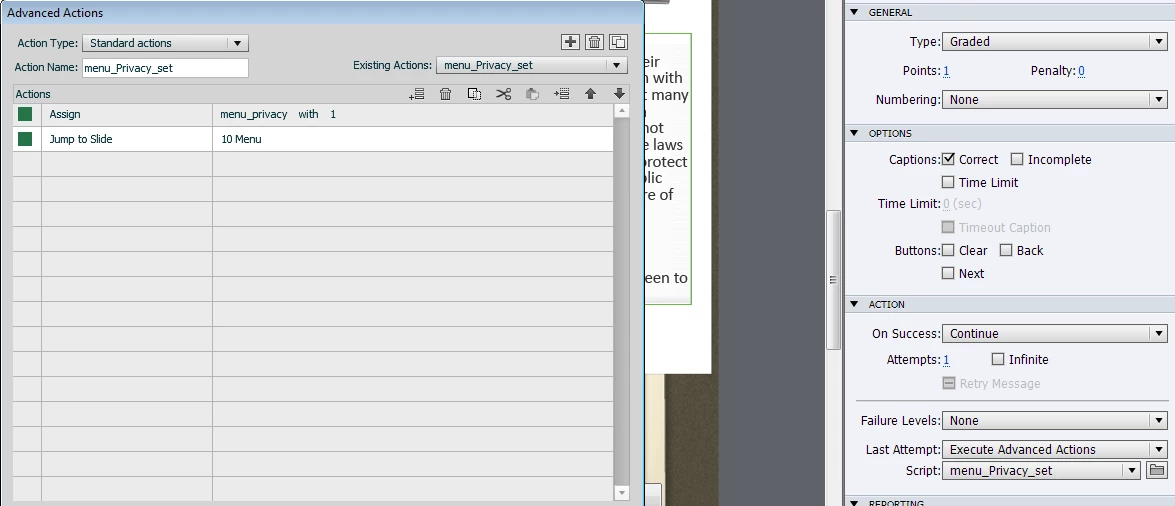
In this case, the course was no longer blocked from moving forward when the question's feedback is reviewed. However, the course continues on to the next slide and does not return to the main menu as desired.

I then attempted to remove the Jump to Slide instruction from the Advanced Action, assign the value count to the Action field on slide entry, and set the Jump to Slide option as the Action on Success and Last Attempt options on the quiz. Once again, the course appears to freeze once the question feedback is delivered to the user.

These actions appear to function as desired when not assigned to a quiz slide.

Is anyone aware of a way I can work around this?  Both the quiz question data must be recorded as well as the user being returned to the menu, so I don't want to place the script on the final content slide (pre quiz).

This topic has been closed for replies.

2 replies

Lilybiri
Legend
January 4, 2014

Failure level is set to 0, so no Feedback when the attempt is failes is necessary?

I suspect you have the option "Answer All" checked in Quiz settings. Please post a screenshot of the Quiz settings!

Also: did you check if you are remaining in the Quiz scope when going to the menu slide? You can insert the system variable "cpInQuizScope" in a text container on the Menu slide and set it to display for the rest of the project while testing.

s_semperAuthor
Known Participant
January 6, 2014

Lilybiri,

Thanks so much for taking the time to respond to my plea for help.

The Failure level is set to 80% to pass, and individual feedback displays for each question regardless of whether or not the answer selected is correct.

I don't have "Answer all" selected, but I do have "Required - The user must take the quiz to continue" selcted.

The user does have to pass the quiz to gain a certificate and we are tracking quiz results in a database.

My Quiz Settings are:

I am adding the cpInQuizScope variable as you suggested and will report back on if that resolves the issue.

s_semperAuthor
Known Participant
January 6, 2014

I've attached screenshots of the individual quiz slide properties for the final quesiton in the topic below:

RodWard
Community Expert
Community Expert
January 4, 2014

Your issue is likely to be that jumping back to the Menu slide is not permitted for some reason by your quiz settings.

Do you have Backward Movement allowed?  Do you have the Quiz > Settings > Required option set to something other than Optional?

s_semperAuthor
Known Participant
January 6, 2014

Thanks so much for your reply Rod.

Also, thanks for your "Advanced Actions.." eBook as it has been a huge help as I try to move from Articulate to Captivate.

I do have the Required field set to "Required - The user must take the quiz to continue".  I'm not sure if I can set it to optional as I do need the user to complete the full quiz (across all topics) and receive a pass/fail grade in order to gain a certificate and have a score passed along to our tracking database.

If I set it as "Optional", will this still force the user to complete the quiz in order to complete the course?