
Inspiring
June 3, 2016
Answered

Passing values to Javascript arrays

  • June 3, 2016
  • 1 reply
  • 5389 views

I'm trying to wrap my head around substituting and combining arrays in Javascript. I've found some code that works to combine arrays, de-duplicate and then sort alphabetically (below).  My question is, how can I fill these arrays with other values that are chosen by the user, rather than defining them myself in JS?  For instance, if a user clicks a different button, I'd like array1 to be filled with 4 new animal names?  I would think there's a way to assign a CSV string to the Captivate variable value and split this into array values in JS. Thanks.

Array.prototype.unique = function() {

    var a = this.concat();

    for(var i=0; i<a.length; ++i) {

        for(var j=i+1; j<a.length; ++j) {

            if(a === a)

                a.splice(j, 1);

        }

    }

    return a;

};

var array1 = ["cat","dog","snake","shark"];

var array2 = ["frog","cow","eagle","shark"];

var arrayFinal = array1.concat(array2).unique();

alert(arrayFinal.sort());
This topic has been closed for replies.
Correct answer TLCMediaDesign

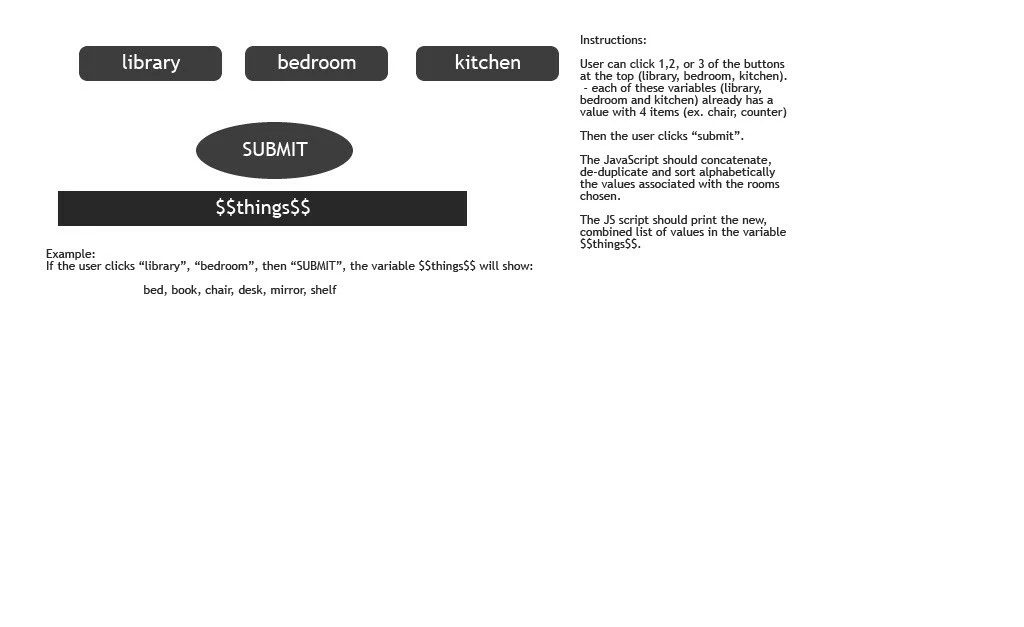
Hi again, here I've made a pseudo project.  The variables "library", "bedroom" and "kitchen" have string values with four CSV items each:

chair,desk, book,shelf

bed,mirror,chair,shelf

shelf,counter,mirror,sink

Sorry if I'm asking the wrong questions.  This may be a lot more complicated than I imagine. If so, no problems - I'll ask my computer dept.


If you put the following JavaScript in the head of your index.htm  just after the <script> tag an just above function initializeCP(), this code will work for you. If you select bedroom or any of the other arrays it will add it to the array, if you select it again it will remove it.

On the Library button execute JavaScript: newArray(library)

On the Bedroom button execute JavaScript: newArray(bedroom)

On the Kitchen button execute JavaScript: newArray(kitchen)

On the Submit button execute JavaScript: newThings( )

var someThings = [ ];
var selected = [ ];

var library = [ "chair", "desk", "book", "shelf" ];
var bedroom = [ "bed", "mirror", "chair", "shelf" ];
var kitchen = [ "shelf", "counter", "mirror", "sink" ];

function getUnique( arr )
{
    var dupes = [ ];

    return arr.filter( function( item )
{
        return dupes.hasOwnProperty( item ) ? false : ( dupes[ item ] = true );
    });
}

function newArray( arr )
{  
var temp = [ ];

if ( selected.indexOf( arr ) != -1 )

  selected.splice( selected.indexOf( arr ), 1 );
 
  for ( var i = 0; i < selected.length; i++ )
  {
   temp = temp.concat( selected[ i ] ).sort();
  }
 
  someThings = temp;
}
else
{
  selected[ selected.length ] = arr;
  someThings = someThings.concat( arr ).sort();
}
}

function newThings( )
{
var str = getUnique( someThings ).toString();
var res = str.replace( /,/g, ", ")
window.cpAPIInterface.setVariableValue( "things", res )
}

1 reply

TLCMediaDesign
Inspiring
June 3, 2016

Somehow I get the feeling that you are going about this the wrong way. If you are defining the arrays to begin with. Why don't you just set them up. Why concatenate when you defined them to begin with?

Most of these array functions are to manipulate dynamic data. In the above example, why don't you just create and array:

var arrayFinal = ["cat", "cow", "dog", "eagle", "frog", "snake","shark"];

Also, if you are having a hard time with arrays, I don't think you should be jumping into prototype.

Maybe you need a multi-dimensional array? Maybe if you would explain what you are trying to do we could set you down the right path.

Lilybiri
Legend
June 3, 2016

+1000 David, that is what I asked him already several times: what is the 'goal' he wants to achieve? Why store a CSV string in a Captivate variable to populate an array outside of Captivate to do what?