Participant
October 6, 2013
Answered

Play audio action doesn't work in Captivate 7

  • October 6, 2013
  • 1 reply
  • 1048 views

Hi,

On the first slide of my course I added a "quick start" guide. It consists of a series of captions containing text. In each caption there's a "Continue" text link triggering an advanced action to hide the current caption and show the next one. This works perfectly.

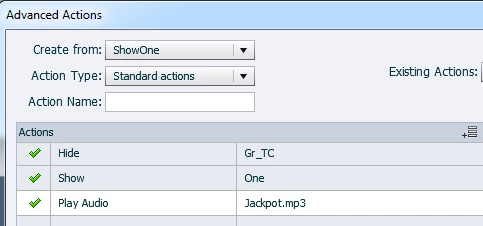
Now I wanted to attach audio to each step of the guide. I added a "play audio" action after the show/hide actions for the first step. No audio was playing. When I changed the play audio to be the first action in the script - the script didn't work at all. When I changed it to be between the hide and show, the hide worked and show didn't. What I understand from this is that play audio doesn't work and also halts the whole thing.

Any advice?

Thanks
This topic has been closed for replies.
Correct answer Lilybiri

Just checked it out, created a shared action with almost exactly the same commands, but grouped all the text containers in one group Gr_TC

to hide:

It worked perfectly. You don't see a label, because it is a shared action, for which I just filled in some parameters. Attached it to three buttons, had 3 text containers and 3 different audio clips.

Is the audio clip playing when you use it in another way? The only difference seems to be that you have a VO clip and I used one of the included sounds with Captivate.

Another way could be to attach the audio to the text container as object audio. Once you show the text, audio will play, when you hide the text it will stop. That was the way to go before CP6:

http://blog.lilybiri.com/playtime-with-audio-and-widgets

Lilybiri

1 reply

Lilybiri
Legend
October 6, 2013

Could you post a screenshot of the advanced action? And is the audio clip playing when you use it attached to a slide or an object?

Lilybiri

Participant
October 6, 2013

Thanks for the reply. I attached the screenshot. I did try to use it as slide audio and it works.http://cl.ly/image/0B3l252i3a2q/Screen%20Shot%202013-10-06%20at%2012.32.05%20.png

Lilybiri
LilybiriCorrect answer
Legend
October 6, 2013

Just checked it out, created a shared action with almost exactly the same commands, but grouped all the text containers in one group Gr_TC

to hide:

It worked perfectly. You don't see a label, because it is a shared action, for which I just filled in some parameters. Attached it to three buttons, had 3 text containers and 3 different audio clips.

Is the audio clip playing when you use it in another way? The only difference seems to be that you have a VO clip and I used one of the included sounds with Captivate.

Another way could be to attach the audio to the text container as object audio. Once you show the text, audio will play, when you hide the text it will stop. That was the way to go before CP6:

http://blog.lilybiri.com/playtime-with-audio-and-widgets

Lilybiri