Inspiring
August 28, 2014
Question

Play Audio in Advanced Actions Isn't Working

  • August 28, 2014
  • 1 reply
  • 533 views

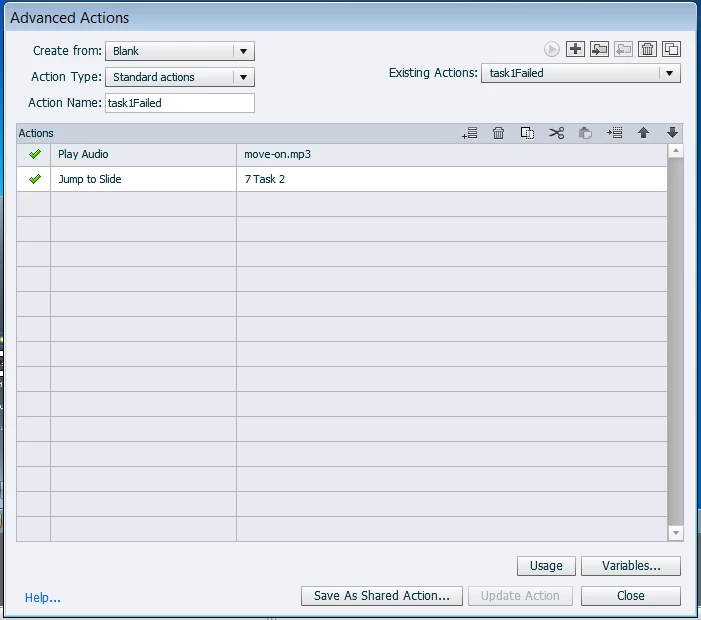
When I use a Play Audio in Advanced Actions followed by a Jump to Slide action, the audio does not play in Preview or live modes.  It just skips the audio and jumps to the slide I want it to jump to.

Does anyone know why Cp8 skips the Play Audio and just jumps to the appropriate slide?

Jim
    This topic has been closed for replies.

    1 reply

    Lilybiri
    Legend
    August 28, 2014

    What do you really want? Why not just put the Jump before the Play Audio, then it will play on that slide. All actions in an advanced action are executed in sequence, immediately.

    JimGABCAuthor
    Inspiring
    August 28, 2014

    Well, Cp8 isn't executing the play audio in the advanced action.  Here's what I want:

    If a user fails to click in the right place, I want to play an audio file that says "You haven't completed this task correctly. Let's move on to the next task."  Then I want Cp8 to jump to the next task (about seven slides away).  All slides have audio, so if I tell Cp8 to jump first then play the audio, wouldn't the audio on the jump to slide play too?  Then there would be overlapping audio.

    Lilybiri
    Legend
    August 28, 2014

    I tried to explain that everything is done at the same time, you are not pausing to play the audio clip. If you want to do that, you'll need to stay on the slide itself before jumping. Which event is triggering this action? If it is a button, the action is executed at the pausing point, you'll have to replace the Jump by Continue, and leave enough time after the pausing point to play that audio clip. Then it depends on the whole navigation structure: you can use a conditional action On Enter of the following slide to jump in case of failure.

    Try to explain, maybe Play Audio is not the best work flow in this case, maybe you'd better attach the audio to a Failure caption that is long enough?