
martas90184366
Participant
October 5, 2016
Question

Playback of sound cuts off too early only on Moodle – Captivate 9 – HTML5

  • October 5, 2016
  • 1 reply
  • 401 views

I have defined action in Advanced Actions to play some sound on click.
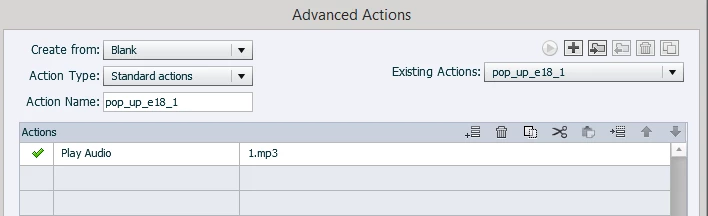
I publish (Captivate 9) to HTML5. When I test content locally the sound plays well. But when I put it to Moodle server it gets cut off. It happens only to sounds played through Advanced Actions. Slide sounds play well both locally and on the server.

Is it Captivate bug?

This topic has been closed for replies.

1 reply

Lilybiri
Legend
October 5, 2016

Just a question: why do you use an advanced action instead of a simple action since you have only one command? You don't need to replace simple actions anymore by standard actions in CP9 because you can uncheck the option 'Continue Playing Project'.


Are you on version 9.0.2? This issue seems to be fixed.

martas90184366
Participant
October 10, 2016

I am on 9.0.2.421 version.

It is just an expamle. In production I am trying to produce pop up effect. I have 5 elements. On click I show 1 element (and play sound) and hide 4 others (stop other sounds). I am affraid I can't produce it by simple action.

Lilybiri
Legend
October 10, 2016

My comment was on your screenshot with an advanced action that had only one command. Apparently you need more than 1 command. It would be good to use a shared action. You do not have to stop the other sounds when you are using "Play Audio", it will automatically stop audio that is still playing. If you group the 'elements' to be shown the shared action would be:

  • Hide Gr_Elements
  • Show Element_x
  • Play Audio_x

The group (will always be the same but is a compulsory parameter), the element and the audio clip will be parameters (those two will change with each application).

Another approach which would reduce the shared action to two commands, would be to attach the audio clip to the element to be shown. When the element is hidden with the group, the audio clip will stop automatically, when an element is shown, the attached audio will play. In that case the third command will not be necessary.