
Playbar missing in mobile view
Hello there,
I´m wondering why my content does not show the playbar in mobile portrait mode, but in mobile landscape mode?
I´m using Captivate 2017, but working with an "old" file made in Captivate 9. So I do not use fluid boxes, but breakpoints. The script assumes that all major buttons wil be shown on a mobile device:
cp.responsiveButtons =
{
//"ButtonName" : [Primary,Tablet,Mobile],
"Rewind" : [true,true,false],
"Backward" : [true,true,true],
"Play" : [true,true,true],
"Slider" : [true,true,false],
"Forward" : [true,true,true],
"CC" : [true,true,true],
"AudioOn" : [true,true,true],
"Exit" : [true,true,true],
"FastForward" : [true,true,false],
"TOC" : [true,true,true]
I´ve used the standard cpMobile Playbar, set some new colors and changed the png´s to get the customers CI look & feel - nothing else!
This is how it looks:
- in tablet portrait mode
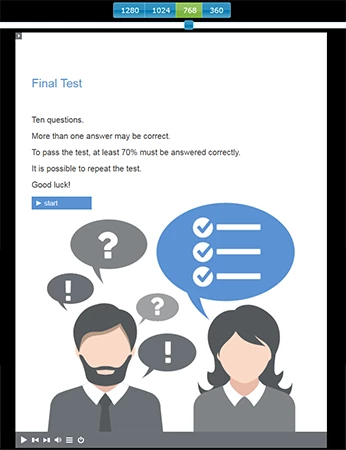
- in smartphone portrait mode:
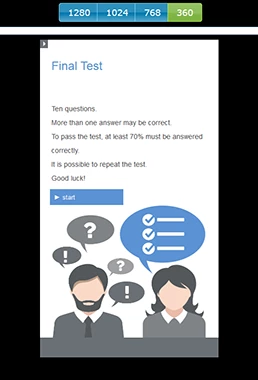
Playbar settings are the same in both views/modes, height is the same and buttons to show also. So why do the buttons dissapear when viewed with a smartphoen (or previewed in smartphone mode)?


 AdChoices