

Bluemoon007
Participating Frequently
July 28, 2017
Answered

Player buttons grayed out after inserting quiz

  • July 28, 2017
  • 1 reply
  • 502 views

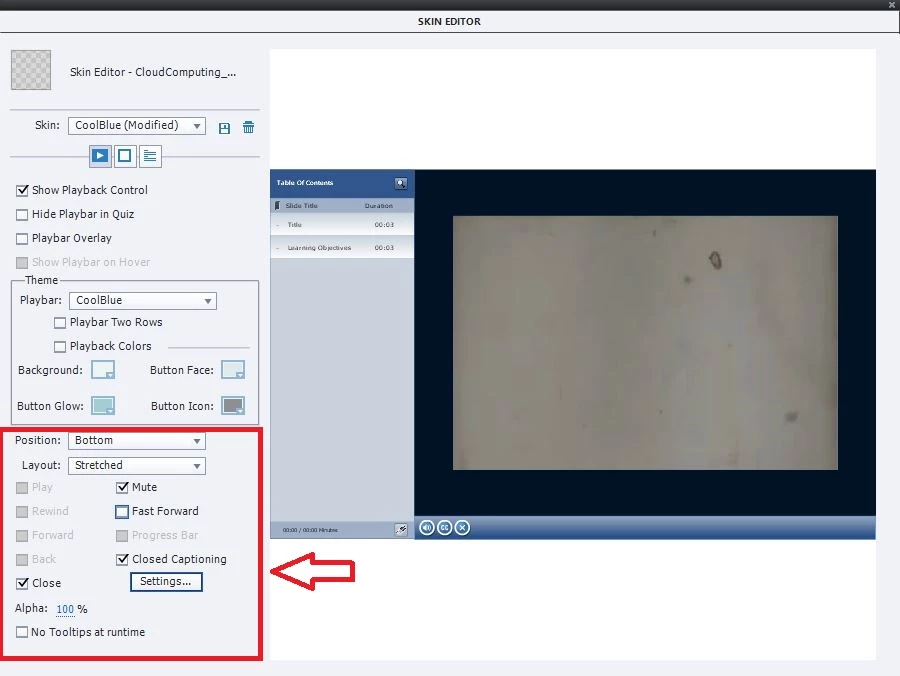
After I insert quiz questions some of my player control buttons are missing in the preview mode and if go to the Skin Editor (Themes>Skin Editor) the buttons such as Play, Rewind, Forward, Back are grayed out and the only ones available are Mute, Close and Closed Captioning. Frustrated with Captivate 9.

Before Quiz Questions

After Quiz Questions buttons such as Play, Rewind, Forward, Back are grayed out and the only ones available are Mute, Close Fast Forward and Closed Captioning
    This topic has been closed for replies.
    Correct answer Lilybiri

    Navigation by playbar and by TOC becomes impossible in two situations:

    1. If you inserted Pretest Questions
    2. If you checked the option 'Branch aware' in Quiz, Preferences.

    I cannot know from your screenshots which one you have set up.

    1 reply

    Lilybiri
    LilybiriCorrect answer
    Legend
    July 28, 2017

    Navigation by playbar and by TOC becomes impossible in two situations:

    1. If you inserted Pretest Questions
    2. If you checked the option 'Branch aware' in Quiz, Preferences.

    I cannot know from your screenshots which one you have set up.

    Bluemoon007
    Participating Frequently
    July 28, 2017

    Thank you so much for your response. I had inserted pre-test questions. So if I gather correctly, inserting pre-test questions would affect the play bar. Why even have half baked functionality included in a new release. Just adds to user frustration and disappointment. Thank you so much for your response. WIll just add regular questions and choose them not to be graded; hopefully, I can still capture their input as a workaround for Pre-test questions.

    Lilybiri
    Legend
    July 28, 2017

    I'm sorry about that but Pretest questions have their limitations (I will rarely use them myself): they have to be in sequence at the start of the course, you need to edit the conditional pretest action which is meant to have navigation based on the result of the Pretest. That is a bit similar to Branch aware, both situations  are designed for imposed navigation. To avoid breaking up that compulsory navigation the normal navigation is not allowed. It is the design, you may label that as half-baked, I just tried to explain te reasons behind it.

    You can use non-scored questions as pretests, or if you are on 9 or later, Knowledge Check slides. Have a look at:

    Knowledge Check Slides - tips - Captivate blog

    Problem with normal quiz slides is that some of the system quizzing variables will take into account the non-scored questions. Here is another link:

    Using Quizzing System Variables - Captivate blog