
Known Participant
July 16, 2019
Question

Playing audio in knowledge check questions

  • July 16, 2019
  • 1 reply
  • 416 views

Hi all,

Just a question if I may as this is driving me nuts!

I have created an e-learning module with a Knowledge based question and I need to play some audio in the background if they get it RIGHT.

I have put an action in the Quiz properties section (in RED below) OK it's called "submit_monopoly_actions1"
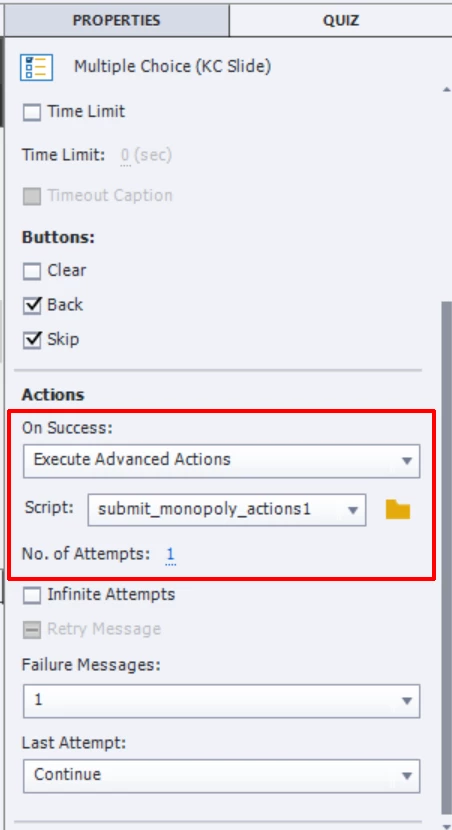
When the code is opened, I have this below:-
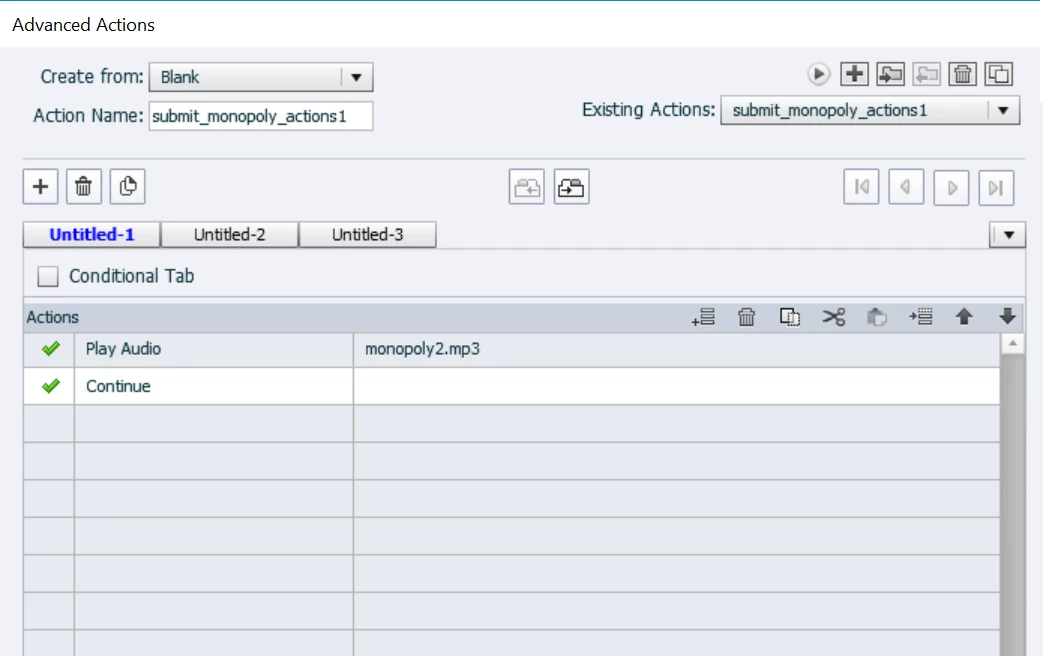
Now, this doesn't see to WORK when I preview...

I have a SUBMIT button and ideally when the user clicks this and gets the question right, the audio
should play and then they can click anywhere on the screen to continue to the next slide.

Am I doing something wrong here?

Thanks in advance...

Keith

    This topic has been closed for replies.

    1 reply

    Lilybiri
    Legend
    July 16, 2019

    This would have been very easy for a normal quiz slide, because you could attach the audio to the Success message. But there is no Success message for a KC slide.

    I tested that actions, and it works perfectly.... provided there is enough time for the audio to play! Since you add Continue in the action, it can only play for the inactive part of the KC slide which is by default 1.5secs or did you edit the slide duration?

    Possibilities:

    1. Increase the length of the inactive part, but that may cause issues for the Last attempt action (if you have one? Depends on number of Attempts)
    2. Add a Delay Next ... to the advanced actions, before the Continue command. Make the delay approximately the same as the audio length.
    3. Add a custom shape button (Next) to the KC slide, with a pausing point later than the KC pausing point, and give it the action 'Go to Next slide'
    keith888Author
    Known Participant
    July 17, 2019

    Hi,

    Thank you for your swift reply!

    Just a few questions if I may...

    The inactive part is this I take it in RED:-

    Also, I have found that you cannot add a custom button to a KC slide.

    Thanks

    Lilybiri
    Legend
    July 17, 2019

    Yes, are you new to Captivate? You need to read some blogs I wrote about Quizzes and about the Pausing point in a timeline:

    Here is just one link about Timeline:

    Pausing Captivate's Timeline - Captivate blog