Participant
June 18, 2021
Answered

Please Help! Adding Closed Captions to Captivate Quiz

  • June 18, 2021
  • 1 reply
  • 1186 views

I'm creating an eLearning video.  Closed captioning text and aduio has been added for all slides and for a quiz.  However, the CC won't show in the quiz.

Did I forget something?  Text was added to the CC and Synced; but when I view the project, the CC doesn't show in the quiz.  It does appear for the rest of the project.

Thanks in advance.

    This topic has been closed for replies.
    Correct answer RodWard

    Closed Captioning text is actually part of the Playbar functionality.

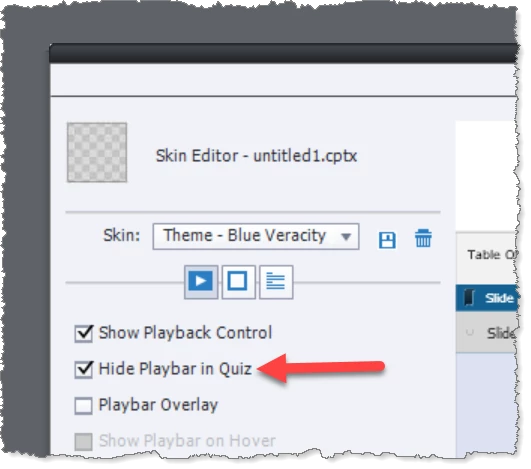
    Check your Playbar settings to see if you have the course configured to NOT show the playbar during the quiz.

    If so, that would explain why your CC text is not showing during the quiz either.

    1 reply

    RodWard
    Community Expert
    RodWardCommunity ExpertCorrect answer
    Community Expert
    June 18, 2021

    Closed Captioning text is actually part of the Playbar functionality.

    Check your Playbar settings to see if you have the course configured to NOT show the playbar during the quiz.

    If so, that would explain why your CC text is not showing during the quiz either.

    Participant
    June 18, 2021

    Rod.  Thanks so much!  I had that turned on.  Couldn't find this info anywhere!

    Thank you, Thank you, Thank you!

    Participant
    June 18, 2021

    I'm sorry; I have a follow-up question.

    I adjusted the settings as you suggested; but now the Closed Captions in the Quiz Flash and don't stay on the quiz slide.  

    I also removed the Header on the Quiz slide in case that was causing the problem.

    I'm using the Question Pool feature as I'm using random True/Fals questions from 4 different question blocks.  There is likely another setting I need to edit.  Any suggestions?  

    Thanks again in advance.