
AHwalek
Inspiring
January 9, 2018
Answered

Popup for entire course - hide during development

  • January 9, 2018
  • 2 replies
  • 402 views

Hello,

I created a Resource popup on an early page and set it to display for the rest of the project. It is displayed using a button with an advanced action and it works as expected. The problem I'm having is that the resource text makes it difficult to work on the rest of the course as the popup remains visible on top. When I turn off "always on Top" it goes away, but it also doesn't display, which isn't very useful.

I feel like I'm missing something simple. How do I get the on-demand popup to not cover the course as I develop?

Thanks,

Tony H
    This topic has been closed for replies.
    Correct answer Stagprime2687219

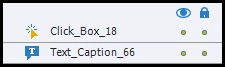
    Have you tried clicking the spot under the eyeball on your timeline for that object?

    2 replies

    AHwalek
    AHwalekAuthor
    Inspiring
    January 12, 2018

    While hiding the groups does work, sometimes it gets wonky and requires a restart for it to work properly again.

    Participant
    January 13, 2018

    "><akshay

    Stagprime2687219
    Stagprime2687219Correct answer
    Legend
    January 9, 2018

    Have you tried clicking the spot under the eyeball on your timeline for that object?

    AHwalek
    AHwalekAuthor
    Inspiring
    January 10, 2018

    Thank you Stagprime, I thought it was something simple. I didn't think it would effect the downstream slides but it makes sense since the items are set to display for the rest of the project. .

    Lilybiri
    Legend
    January 11, 2018

    Since there is a lot of confusion about the 3 eye buttons in Captivate, I wrote this blog post:

    1-2-3 Eye Buttons Mystery - Captivate blog