
Participating Frequently
August 7, 2018
Answered

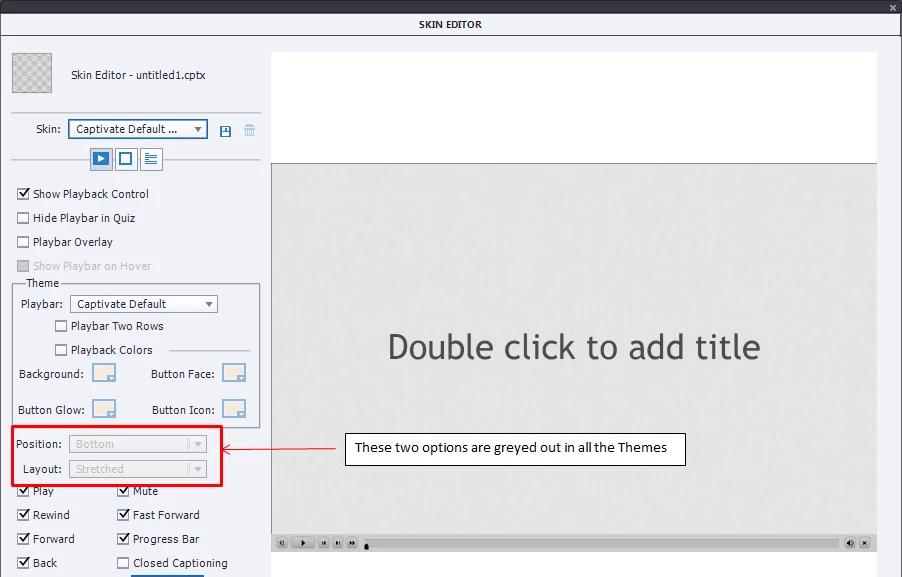
Position and Layout of Playbar are greyed out in Captivate 2017

  • August 7, 2018
  • 1 reply
  • 921 views

I started a new project in Captivate 2017 and wanted to edit the play-bar.

But I saw that the Layout and Position options of the Play-bar are grayed out. It is locked at

Position : Bottom

Layout : Stretched

Hence I cannot move my play-bar around. I tried choosing all the default skins in Captivate 2017, but still these two options are grayed out. How do I make them editable?
This topic has been closed for replies.
Correct answer Lilybiri

Not that I am aware of, since the playbar is programmed to adapt to the size of the screen. Only workaround is to get rid of the playbar and create custom navigation (which is mostly my approach). Most playbars are SWF-based.

1 reply

Lilybiri
Legend
August 7, 2018

I suspect you create a responsive project with FLuid Boxes? In that case you don't have control over the position/layout of the playbar.

Participating Frequently
August 7, 2018

I have created a responsive project, but with break-points. (without fluid boxes)

Kindly let me know if there's any way to resolve this issue.

Lilybiri
LilybiriCorrect answer
Legend
August 7, 2018

Not that I am aware of, since the playbar is programmed to adapt to the size of the screen. Only workaround is to get rid of the playbar and create custom navigation (which is mostly my approach). Most playbars are SWF-based.