Inspiring
August 12, 2012
Answered

Positioning Motion Paths

  • August 12, 2012
  • 1 reply
  • 1509 views

How can I set the x and y coordinates on a motion path so that the path ends at a precise location?

I have 3 objects on a slide that I want to move and left-align. I've been using the trial-and-error method of adjusting the motion path arrows, previewing, and then moving the arrows again, but that is tedious and unexact. It would be much better if I could just set the desired coordinates.

I thought maybe I could edit the xml file, but I'm a long ways from being advanced enough to understand what I'm looking at so I don't know if that's even possible.

I'm using CP 6.0, if that matters.

Thanks for your help.

Dan

    This topic has been closed for replies.
    Correct answer Lilybiri

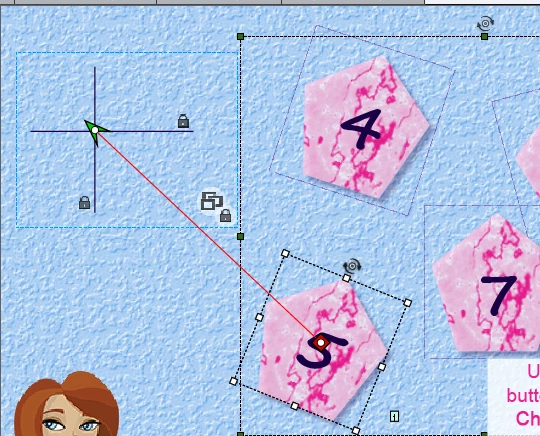
    I really want there would be an easy way...but there isn't. Either you have to plunge into the XML that defines each effect, also the motion path (most of them are relative to the present position of the object on the stage), or you find another way. I  can only explain my way: in my templates I always have a crosshair, object group with a vertical and a horisontal line that I can position exactly using the Transform accordion. Motion paths are always referencing to the center point of the bounding box of the object, I drag the start or the end point of the path on the crosshair. Maybe a screenshot would explain better, but I have to switch the browser, forum doesn't allow posting images with Chrome for the moment.

    Lilybiri

    1 reply

    Lilybiri
    LilybiriCorrect answer
    Legend
    August 12, 2012

    I really want there would be an easy way...but there isn't. Either you have to plunge into the XML that defines each effect, also the motion path (most of them are relative to the present position of the object on the stage), or you find another way. I  can only explain my way: in my templates I always have a crosshair, object group with a vertical and a horisontal line that I can position exactly using the Transform accordion. Motion paths are always referencing to the center point of the bounding box of the object, I drag the start or the end point of the path on the crosshair. Maybe a screenshot would explain better, but I have to switch the browser, forum doesn't allow posting images with Chrome for the moment.

    Lilybiri

    Inspiring
    August 13, 2012

    Thanks for the response, Lilybiri. This is a great workaround for something that should be simple.

    I always learn so much from you.

    Dan

    Lilybiri
    Legend
    August 13, 2012

    You're welcome. I have logged several requests to enhance the Effects work flows, one of them is to be able to define more precisely motion paths (and to have curved paths as well of course). It would help to push such requests more to the top of the priority list, if you would do the same.

    Preparing a blog post about resetting such motion effects, found a workaround that works well in CP6, but have to check whether it is also the case for previous versions. Since a lot has changed in CP6, I'm not that sure.


    Lilybiri