
Participant
May 25, 2011
Answered

Possible to make mouse cursor invisible in Full Motion Capture?

  • May 25, 2011
  • 1 reply
  • 968 views

Hi!

We need to capture interacting with our UI in Full Motion so we can edit it later in After Effects.

We want it to be very clean so I was planning on adding the mouse cursor later through AE (so I could make the movements perfect).

Is there a way to make it so Captivate doesn't record the mouse cursor in Full Motion mode? Or actually, any way for Captivate to perfect the mouse movements (goes straight to every click, easing)?

Thanks!
This topic has been closed for replies.
Correct answer Captiv8r

Hi there

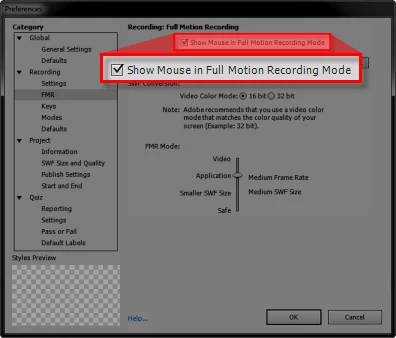
There seems to be an option for me in the Recording Preferences to not capture the mouse pointer. Does this not work?

Click Edit > Preferences > Recording > FMR and clear the option labeled Show Mouse in Full Motion Recording Mode

Cheers... Rick

Helpful and Handy Links

Captivate Wish Form/Bug Reporting Form

Adobe Certified Captivate Training

SorcerStone Blog

Captivate eBooks

1 reply

Lilybiri
Legend
May 26, 2011

Hello,

Since FMR is really working like a video, I do not think it is possible to have the mouse cursor not showing, as is the case for most screen recording applications.

Just wondering if you couldn't capture in Automatic mode (demonstration), where you can delete the mouse object if necessary, and then export to FLV or F4V? AFAIK that format can be imported in AE (as can SWF).

Lilybiri

Captiv8r
Captiv8rCorrect answer
Legend
May 26, 2011

Hi there

There seems to be an option for me in the Recording Preferences to not capture the mouse pointer. Does this not work?

Click Edit > Preferences > Recording > FMR and clear the option labeled Show Mouse in Full Motion Recording Mode

Cheers... Rick

Helpful and Handy Links

Captivate Wish Form/Bug Reporting Form

Adobe Certified Captivate Training

SorcerStone Blog

Captivate eBooks

Participant
May 30, 2011

DOH!!!

Thanks ya'll, appreciate the help =)