Inspiring
April 2, 2012
Answered

Post Results is hanging on login screen and no results transferred to acrobat.com

  • April 2, 2012
  • 1 reply
  • 803 views

Hello there

I am having and issue with posting results to acrobat.com.

I have set up the preferences as per the tutorial and I have the Post Results button on the final screen.

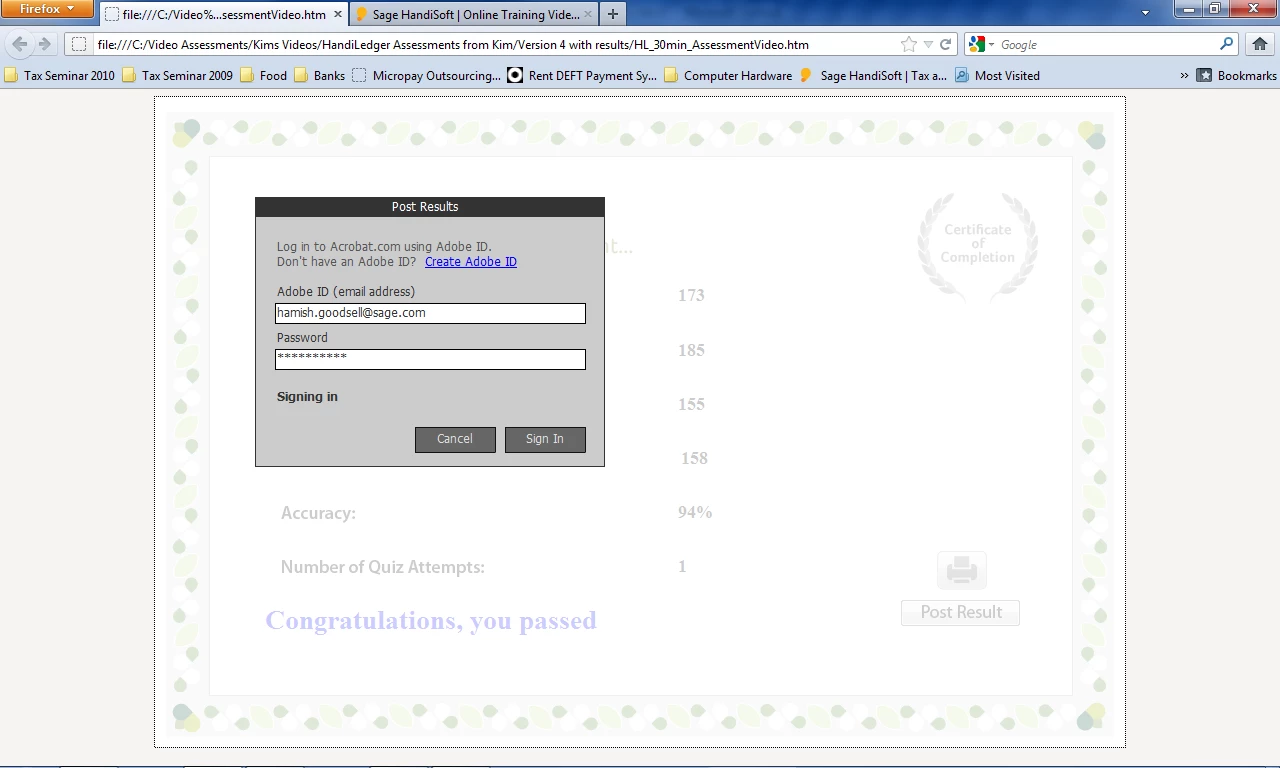
When I enter the acrobat.com login details to transfer the results to acrobat.com, the screen just sits on the Post Results screen and says signing in but it never successfully signs in and the results are never posted. I have had another person attempt it also and they get the same issue. Below is an image of the screen.

Please Help.

Thanks

Kim
This topic has been closed for replies.
Correct answer RodWard

The URL in the address bar of your screenshot shows this particular Captivate module is being accessed from your C: drive. 

Have you made sure you've set up this publish folder location as a trusted location in your Flash Global Security settings?  If not, this may be the reason why this is not working.

1 reply

RodWard
Community Expert
RodWardCommunity ExpertCorrect answer
Community Expert
April 2, 2012

The URL in the address bar of your screenshot shows this particular Captivate module is being accessed from your C: drive. 

Have you made sure you've set up this publish folder location as a trusted location in your Flash Global Security settings?  If not, this may be the reason why this is not working.

Inspiring
April 2, 2012

I have put the Folder where it is located into the Trusted Sites for the Flash Global Settings and I still have the same issue?

Thanks

Kim

RodWard
Community Expert
Community Expert
April 2, 2012

Have you and the other users experiencing this issue tried logging into Acrobat.com with their relevant credentials to verify their Adobe ID is actually recognised?

Are you able to upload the same module to a web server somewhere and try delivering this module via HTTP to log into Acrobat.com