
Inspiring
June 30, 2015
Answered

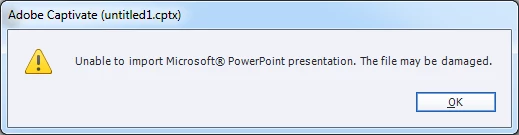
.PPTX (2013) won't import to Captivate 8.0.1 ("File may be damaged" error)

  • June 30, 2015
  • 2 replies
  • 776 views

Windows 7, Powerpoint 2013 and Captivate 8.0.1

Cannot import .pptx file into Captivate project. Both are fresh files created for testing purposes. ONLY working solution I've found is to save in .ppt format and import that way.
This topic has been closed for replies.
Correct answer jmacfar4

In my case, turns out I needed to run a "Repair" on my MS Office Professional 2013 suite. Got some help from Adobe support chat. Something with Powerpoint 2013 not handling the PPTX -> PPT conversion part of the import process.

2 replies

jmacfar4AuthorCorrect answer
Inspiring
July 28, 2015

In my case, turns out I needed to run a "Repair" on my MS Office Professional 2013 suite. Got some help from Adobe support chat. Something with Powerpoint 2013 not handling the PPTX -> PPT conversion part of the import process.

Erik Lord
Inspiring
June 30, 2015

I have a system with the same setup (at least, close) but can't duplicate the problem...

Windows 7 Enterprise, CP 8.0.1.242, PPT/Office 2013

in Captivate, I selected File > New Project > Project From MS Powerpoint

-browsed to a pretty simple PPTX fle

-Imported (allowing 'high fidelity' and 'linked')

All worked fine.

I'd suspect either:

1. Something funny with one of the installs (i.e. latest version of CP?)

2. Something in the PPTX that CP can't handle - complex animation, embedded SWF/video (which may be why it works when you save as .ppt - some .pptx feature is stripped out?)

jmacfar4Author
Inspiring
June 30, 2015

Using Win 7 Professional, but same builds/versions of Captivate/Powerpoint

PPTX test file is from a new blank presentation. added only 2 slides with text. (Link to file if you like to try).

http://adobe.ly/1GKv2Od

RodWard
Community Expert
Community Expert
July 1, 2015

Are you launching Captivate with Run As Administrator privileges?