


danielb51742821
Inspiring
August 1, 2022
Answered

Preloader delayed

  • August 1, 2022
  • 1 reply
  • 921 views

Sorry if this is duplicated, but I thought I submitted this but it didnt see to be successful. So, this is re-writing what I had by memory........

Captivate 2019 11.5.5.553

I am publishing a html scorm from captivate. The package is 255mb. I have the same undesired results (delayed preloader) when I preview (F11) in captivate, extract the scorm locally and play it in the browser, and after I upload the scorm. 

The issue is there is approximately 2 seconds before the preloader animation starts. In this time period the play button and TOC are active. If something is clicked on before the animation appears, the user needs to sit through a blank white screen until it loads enough to start playing. (If the user is patient and waits, the preloader animation will play fine.)

Users first reported the course was not working because they saw the blank white screen and just impatiently closed the course. We would like to solve this by one of two ways if possible:

  1. Make the preloader animation appear sooner. (When the preloader is allowed to play, nothing is active, which is expected and good)
  2.  Do not display play button or TOC until the preloader is complete.

Any suggestions?

Here are my settings:
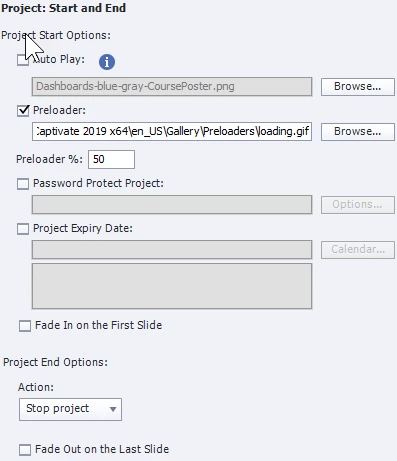


    This topic has been closed for replies.
    Correct answer Lilybiri

    Thanks for the ideas. For some reason I cannot leave them blank now that something has been added. I uncheck, save, revisit the setting, recheck and the same value appears in the fields.

    However, the new behavior is as follows: open training, circular spin preloader (not the preloader I had set), then the play button appears and is active. Click it and blank main frame with TOC in view for about 12 seconds, then it plays. Going to try some more approaches since this is problematic for us. 


    Just FYI: % preloader was only functional for SWF output.

    Why not use a poster image to avoid the blank frame?

    It is recommended to avoid video, audio and complicated actions/effects on the first slide of a project.

    1 reply

    Stagprime2687219
    Legend
    August 1, 2022

    I am going to throw out a couple ideas that are unrelated to your settings.

    255MB is a big file in my opinion.

    Is there a way to logically break up your content into smaller modules?

    Are there a ton of images that could use some optimization for reduced file size?

    Having a smaller file size could potentially help provide some relief to this issue.

    danielb51742821
    Inspiring
    August 1, 2022

    I understand what you are thinking, but I dont think the size of the file is related.

    Its only about a 10-12 second loading time, and once loaded the course plays fine.


    Ill see what I can do. The large components are videos which are used as slide videos.

    danielb51742821
    Inspiring
    August 1, 2022

    Not just out to prove you wrong.....I have another scorm within the same LMS course which is 23 mb. Same settings. No videos, audio and images only. Same 2 second delay giving the user enough time to hit play and be forced to look at a blank screen until it loads.


    I tried some of the other preloader gifs that Captivate provides and 2 things, same results and many of them dont animate! Perhaps I will make my own and see if they work better.
